Get started with eBay APIs
Overview
eBay APIs (Application Programming Interface) are the front door to our global marketplace platform. They enable our business to expand into new contexts and allow third-party platforms to extend their value proposition. For over 20 years, the eBay Developers Program has provided our developers with capabilities at scale, and in turn they invent and create fantastic buying and selling experiences for their users.
With the eBay Developers Program, you can use program resources to build and offer any of the following tools or services:
-
Selling—create listings, manage inventory, and post-order activities
-
Buying—discover inventory and manage checkout and bidding tasks
-
Searching—customized interfaces for searching the eBay marketplace
-
Affiliate—earn commissions by creating tools that drive traffic to eBay listings and generate sales. To learn more, see the Affiliate Program
-
Customer service functionality—feedback, customer communications
-
Marketing—promoted listings, coupons, discounts, and item promotions
eBay Developers Program membership is free, and you can use virtually any programming language to interface with eBay APIs. We provide RESTful (REST) and SOAP-based APIs as well as software development kits (SDKs). Program in C#, Java, Perl, PHP, Visual Basic or another language, and tap into the comprehensive technical documentation and extensive selection of samples.
If you haven't joined yet, learn more about the eBay Developers Program or register now.
Join the eBay Developers Program
The first step in using eBay APIs is to join the eBay Developers Program.
-
Complete the registration form. Please use a business email address to register the developer account.
-
Verify your email address in the Re-enter email field.
-
Read and accept the eBay API License Agreement.
-
Verify that you are not a robot.
-
Select Join to submit your form. It will take approximately 1 business day for account approval.
Once you have a developer account, you can set up your account and create your eBay API keysets.
API license agreement
Your use of eBay APIs is subject to the terms in the API License Agreement.
- Purpose: Briefly describe what the API does and why this guide is essential.
- Prerequisites: List what is needed before getting started (e.g., developer account, API key, language, libraries, IDE).
Understand the eBay APIs
API methods generally correspond to particular individual activities that an eBay user would trigger while on an eBay site or application. Each API call has a distinct purpose and may only be applicable at a particular point in the lifecycle of a listing, such as when the item is first listed, when a buyer is considering the purchase of a listed item, or when the seller and buyer are completing an order.
You can select a programming language (such as PHP, .NET, Java, or any other language that you're comfortable with) to interact with eBay APIs. We also have software developer kits (SDKs) to make your programming tasks in these languages easier.
Through the power of eBay APIs, your application can operate independently of the eBay user interface. Your application doesn't need to change every time the eBay user interface changes, and it doesn't need to present data in the same way that eBay does. Your eBay-enabled application can present data in custom ways that best meet your users' needs.
eBay APIs provide programmatic access to an eBay marketplace, enabling you to build custom applications, tools, and services that leverage the eBay marketplaces in new ways. With eBay APIs, you can create applications that perform many of the operations that you can perform on the eBay site, eBay mobile application, or other eBay tools.
The eBay Developers Program offers the following APIs to create innovative solutions that tap into the power of eBay:
-
Sell APIs—Create end-to-end selling applications to help professional sellers with their selling activity on eBay. From configuring account settings and listing inventory on eBay to marketing listings and reporting on seller performance, the selling APIs help you create applications that enable sellers to scale their businesses on eBay. These APIs also cover core capabilities related to general commerce activities, such as identifying appropriate eBay categories, searching for products in the eBay catalog, and retrieving user account profile information.
Note: Traditional APIs—If a function you want to use isn't available in the RESTful APIs above, explore the capabilities in these Traditional SOAP-based APIs. As we improve the RESTful APIs and create new ones, we're also gradually deprecating these Traditional APIs. So consider carefully before you decide to use a Traditional API.
-
Buy APIs—Use these turnkey solutions to create buying experiences in your application or website. Retrieve purchasable items, check out, then track orders without visiting the eBay site
-
Developer APIs—Get insights into your API integrations
Our latest buy and sell APIs provide you with powerful technology and features that let you build applications to provide buyers and sellers with a seamless, connected experience across their commerce workflow.
Understand eBay Marketplaces
Numerous eBay marketplaces exist around the globe. If you want your application to interface with multiple eBay marketplaces, it's important to understand how these marketplaces work.
-
Sellers can list the same item on multiple marketplaces to make the item available to a broader audience. In some cases, eBay will automatically expose the same listing on multiple marketplaces as long as the seller is willing to ship to the country of that marketplace. Learn more about selling internationally.
-
From a buyer's point-of-view, most of the listings that the buyer sees will probably be listings that were created on that marketplace. They could see listings created on another marketplace because eBay is surfacing those listings on the buyer's marketplace.
-
For prices/currencies, eBay converts to the currency of the marketplace where the buyer is viewing the listing. For example, if a buyer is viewing an item that an eBay US seller listed on the UK marketplace, that buyer sees prices converted to British pounds even though the seller listed the item in US dollars. This currency conversion is done automatically by eBay and isn't something the seller or your application needs to do.
-
Common differences between marketplaces are the inventory available and the currencies and languages used. All API schema elements are in English, but the values of some fields are returned in the native language used by the eBay marketplace's country. In some cases, you can use language-related headers to localize some field values into the specified language.
eBay uses predefined site identifiers for each eBay marketplace. You may need to enter a site identifier to specify the eBay marketplace you're working with. Depending on the API call, these IDs may be passed through an HTTP header, through a path or query parameter, or through the request payload.
For a full list of site IDs, see:
-
Marketplace ID values for RESTful APIs
-
SiteCodeType for Traditional SOAP/XML APIs
To learn more about how to use these IDs to set the eBay marketplace, see:
-
HTTP request headers for RESTful APIs
-
Specify the target site for Traditional SOAP/XML APIs
Understand the Sandbox and Production environments
As a member of the eBay Developers Program, you'll work in two environments:
|
Sandbox |
A self-contained virtual testing environment that allows you to test your application without impacting real eBay users, real eBay listings, or real money. As you develop your application, you'll need to test its functionality in the Sandbox by simulating the various tasks related to buying and selling on eBay before you transact in the Production environment. Items listed and sold in the Sandbox aren't real transactions, and all listing fees and item purchases are paid with fictional money. |
|
Production |
The live environment where an eBay-enabled application sends real data to the eBay marketplace with real eBay users, listings, and transactions. An eBay user who views the eBay marketplace through a browser or the eBay mobile application is viewing data in the Production environment. Your application will run in this environment after you go live. |
Sandbox benefits
Testing in the Sandbox has the following benefits:
-
Fully test and debug your eBay API routines before you run them in Production. Make calls to experiment with function calls, prototype new routines, and test your application's business logic.
Important! Don't use the Sandbox for testing eBay service performance or load handling—high call volumes may result in an interruption of service for your account.
-
Test buying, selling, and after-sale workflows without using real money.
-
List and relist items without having to pay real fees to eBay and without any obligation to deliver real items to real buyers.
-
Watch how mock eBay transactions generated by your requests to the eBay APIs are processed, without touching any live eBay listings, user accounts, or bank accounts.
We recommend using Production to test searching capabilities and metadata calls.
Understand user accounts
This table outlines the differences between the following accounts. These accounts are independent and not interoperable across sites.
|
Account |
Used by |
Site where used |
Where to get an account |
|---|---|---|---|
|
eBay user account |
eBay member (buyer or seller) |
|
(for eBay US site) |
|
eBay Developers Program account |
Developer |
||
|
eBay Sandbox user account |
Test user (test buyer or seller) |
Understand application keysets
eBay uses unique identifiers called “application keysets” that tell eBay which application is making a call. An application keyset serves as your application's credentials and is required for making API calls.
-
Application ID/client ID—Uniquely identifies your application; can't be changed
-
Dev ID—Uniquely identifies your developer profile; can't be changed
-
Cert ID/secret—A client secret, like a password for this keyset, that should be kept confidential; can be reset
You can create a separate keyset for the Sandbox and Production environments.
Tip: Just as you would store and protect passwords, use the same caution in storing and using your application keyset. For example, if authorization strings are hard-coded in a compiled application, an unethical individual could see the IDs by inspecting or reverse engineering. We highly recommend using strong encryption of the IDs in your application to prevent credential theft.
Resetting your cert ID
Your application cert ID is like a password for your keyset. If you think your keyset has been compromised, you can change your cert ID at any time. Creating a new cert ID doesn't affect existing user tokens that have already been created for your application.
Once you generate a new cert ID, your old cert ID expires at the end of the grace period that you specify.
-
The grace period can be a value between 0 (expires immediately) and 4000 days. Use 4000 if your company's security standard is to always have two cert IDs available, so that you can switch between them as needed without signing in to the eBay Developers portal.
-
A typical grace period is between 30 and 90 days. During the grace period, both cert IDs are valid, so that you can deploy your application changes and revoke older tokens as needed.
-
You can't use the new cert ID to revoke user tokens that you created with the old ID. If you plan to revoke older tokens, make sure you do so before the old cert ID expires.
- Use Case Description: Explain the specific use case this guide addresses (e.g., integrating payment systems, fetching product data, etc.).
- Why This Use Case?: Briefly explain the importance and benefits of this particular use case.
Create the eBay API keysets
To use the eBay APIs, create the appropriate keyset for the environment where your application will run.
For your application to run in the Sandbox or Production environment, it needs to have the appropriate keyset for that environment.
-
Sign in to your eBay Developer Program account.
-
Go to the Application Keys page.
-
Under either Sandbox or Production, select Create a keyset.
-
On the Create a keyset page, enter your application title, choose the environment (Sandbox or Production), and select Create keyset.
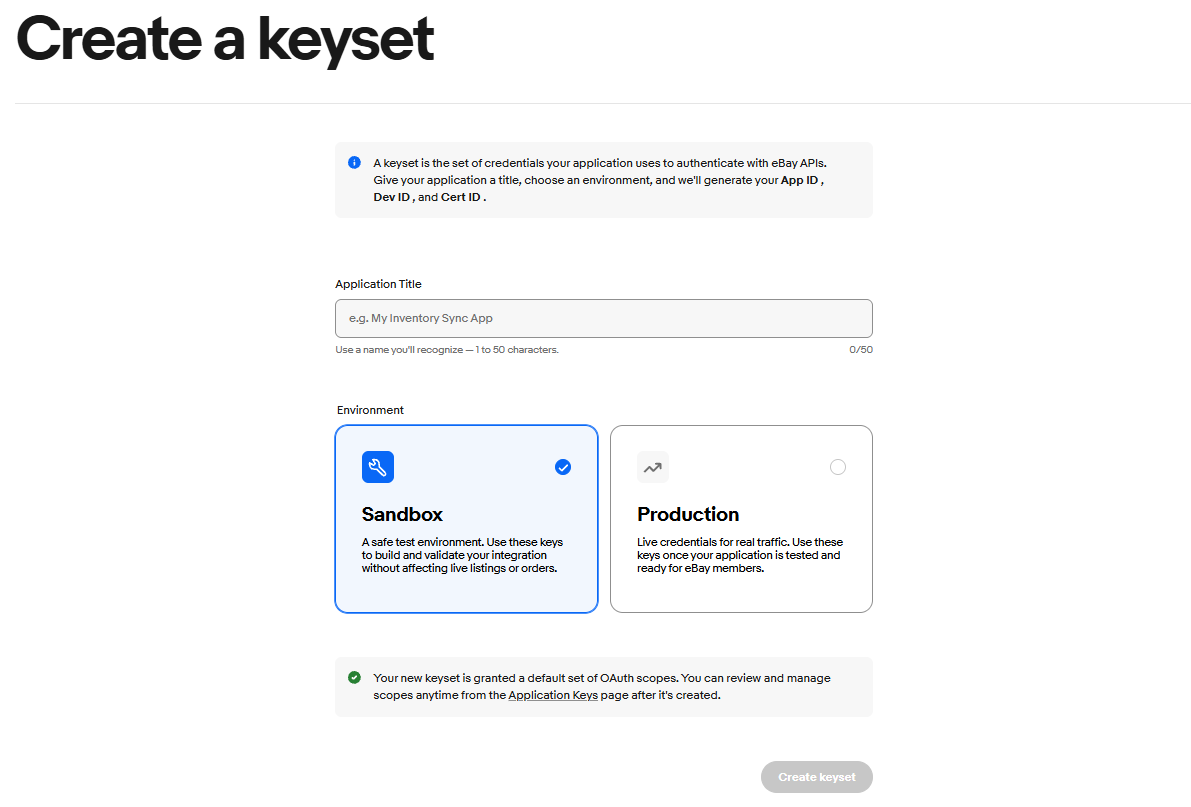
Note: If you have already created an application, you can view it when you login. If you have previously created a keyset for either Sandbox or Production, you have the option to generate a new keyset for the other environment by selecting Create a keyset.
Important! Before you can use your Production keyset, you must subscribe to or opt out of eBay marketplace account deletion/closure notifications. If you see the “Your Keyset is currently disabled” message, select the link in the message to begin the compliance process.
Your keyset appears on the Application Keys page and on your My Account dashboard.
Each application keyset is assigned a set of scopes, where each scope gives the application access to different API methods, resources, and functionality.
Use Request another keyset to request an additional keyset for another application. When you request another keyset, you're asking for an additional keyset for a different application, not a replacement keyset for an application that already has one.
Create a Sandbox user
To test run your application's features and functionality, create a Sandbox user.
Before you start running your application in Production, we recommend that you fully test your application's features and functionality in the Sandbox to make sure your application operates as intended and without error.
Sandbox test users are virtual eBay accounts that exist only in the Sandbox environment. These accounts represent the users who perform the mock transactions you create as you test your application.
To create an eBay test user account:
-
Sign in to your eBay Developer Program account.
-
From any eBay developers page, select Develop > Tools > eBay Sandbox > Create Test Users.
-
On the Register for Sandbox page, complete the form.
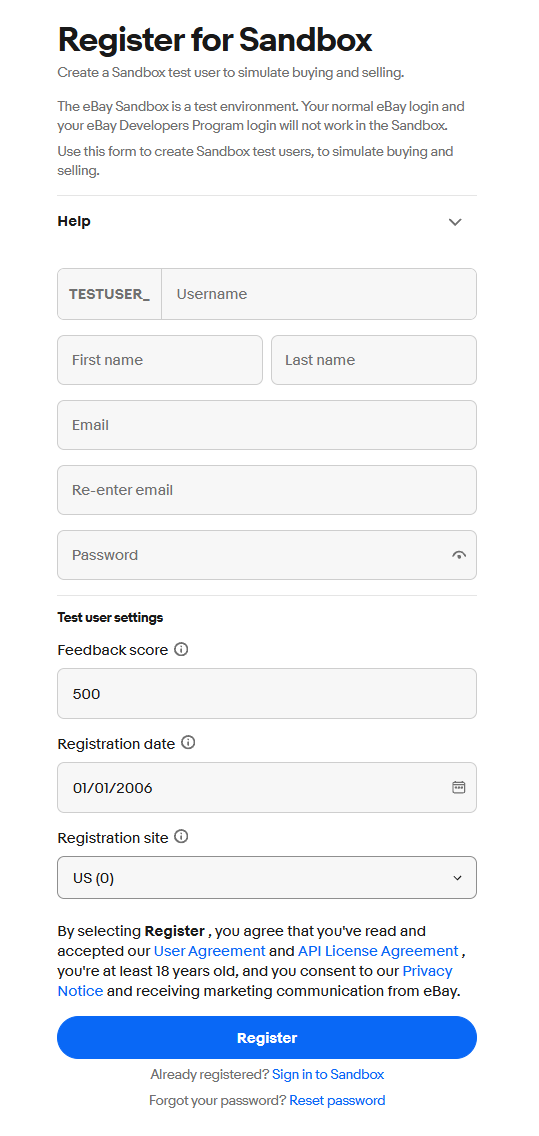
The following table talks more about the constraints and requirements of each field that must be provided in the form:
|
Field |
Description |
|---|---|
|
Username |
Every Sandbox username is prefixed with Tip: Create usernames that help you remember the role that the user will play in your mock transactions. For example, |
|
|
A unique email address is required for each test user. If the email is already being used by another test user, registration will fail. |
|
Password |
Enter a password. Use between 8 and 64 characters, include at least one letter, at least one number, and at least one of these supported symbols: |
|
First Name |
The user's name can be fictitious. |
|
Feedback score |
If needed, change the default values. For help on these fields, select the information icon next to the field. The Registration site value should be consistent with the eBay site where you're going to test, but you may want to experiment with test users from other countries if you want to test cross-border trade and/or international shipping. |
-
Read the User Agreement and API License Agreement, then select Register.
-
Repeat this process to create more Sandbox test users, saving each username and password in a place where you can access them as needed.
Tips on working with test users
The number of test users you need to create depends on the workflows you plan to test in your application. Because transactions have both buyers and sellers, you should create at least one seller and one buyer to test most flows. You need both because eBay doesn't allow a seller to purchase or bid on their own listing, a rule that also applies in the Sandbox.
If you're going to test multiple-quantity, fixed-price listings or auction listings and competitive bidding between multiple buyers, create at least one seller and at least two buyers.
Even if your application only supplies functionality that serves sellers, such as only listing items with no bidding or purchasing, you should also test the effects of buyer actions to make sure that your application handles all of the interactions it may encounter when in Production. We recommend testing your application for typical scenarios including:
- Users placing bids
- Users winning auctions
- Calculating shipping costs
- Handling non-paying bidders
- Creating orders
Find the right API for your use case
Maybe you already have in mind a specific business need for your application. Or maybe you're looking to break into eCommerce application development without a specific type of application in mind. Before you begin application development, it's a good idea to explore the available eBay APIs, including their associated guides and reference docs, to gain a clearer understanding of the features available to you.
-
Sell inventory on eBay—Sell APIs
-
Allow users to buy eBay items without leaving your website—Buy APIs
Important! The Buy APIs listed here are intended for certain approved eBay partners based on their application. See Get Started in a Buying Application to learn more about the application process. Acceptance of applications is based on the proposed business model, as well as a formal agreement to abide by the policies and requirements stipulated by eBay.
Use the API Explorer to try out APIs
API Explorer is a tool that lets you run sample calls for most eBay API methods in the Sandbox and Production environments.
You must be signed in to your developer account to use API Explorer.
Complete this process to run a sample call.
Step 1: Access API Explorer and select the method you want to test
-
Sign into your eBay Developers account.
-
Go to API Explorer.
-
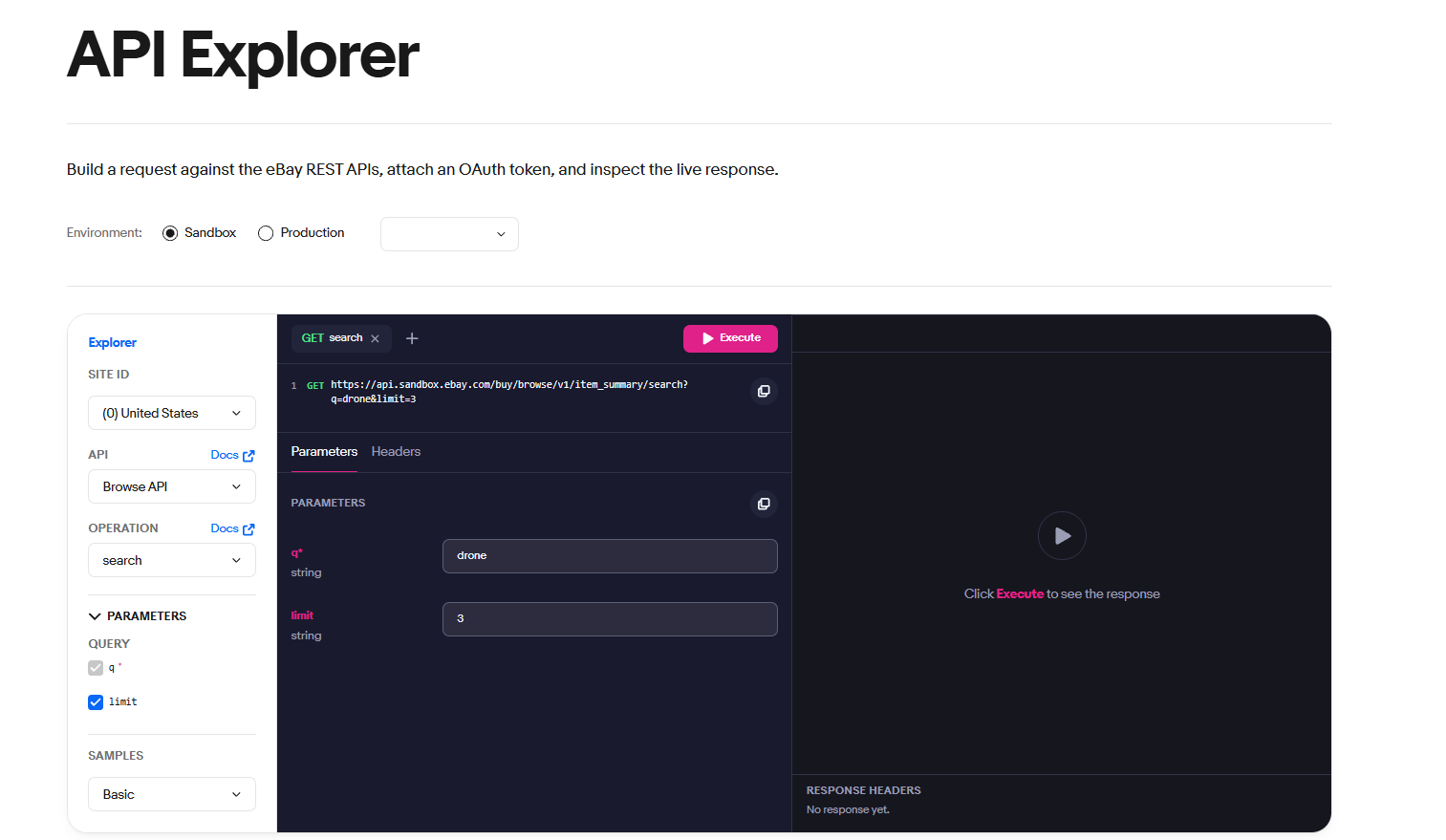
At the left side of the API Explorer, select the following:
-
The Environment where you want to run the call. The application keyset for that environment displays in the box under Environment. If the box is blank, you need to create a keyset for the selected environment (Sandbox or Production) before you can use API Explorer.
Important! If a user access token (not an application access token) is going to be used with the call, make sure to use the link to generate the user access token. This will make the eBay user (for whom the call is being made) go through the consent flow.
-
The Site ID (marketplace) you want to target. This sets this value in the X-EBAY-C-MARKETPLACE-ID header (RESTful) or X-EBAY-API-SITEID header (Trading). For example, if you select (101) Italy, you get
X-EBAY-C-MARKETPLACE-ID:EBAY_ITas the header value.Important! Some APIs and methods are restricted to specific users and/or specific marketplaces. For more details on restrictions for each API, see that API Overview page for that API.
-
The API you want to use. To learn more about the selected API, select API Documentation.
-
The API call you want to test. To learn more about the selected call, select API Call Documentation.
-
Step 2: Authorize calls
Like all calls made to eBay APIs, the calls you make through API Explorer must be authorized.
Nearly all methods work with OAuth access tokens, which is the recommended type of authorization. Auth'n'Auth access tokens are still available for Traditional APIs.
The type of OAuth access token you need depends on the API call you select. A user access token is needed when the operation being performed requires the identity of the eBay user. Either way, all access tokens expire after a short period.
If you need an application access token, select Get OAuth Application Token. The token is generated and added to the Authorization field under the Headers tab of the request panel.
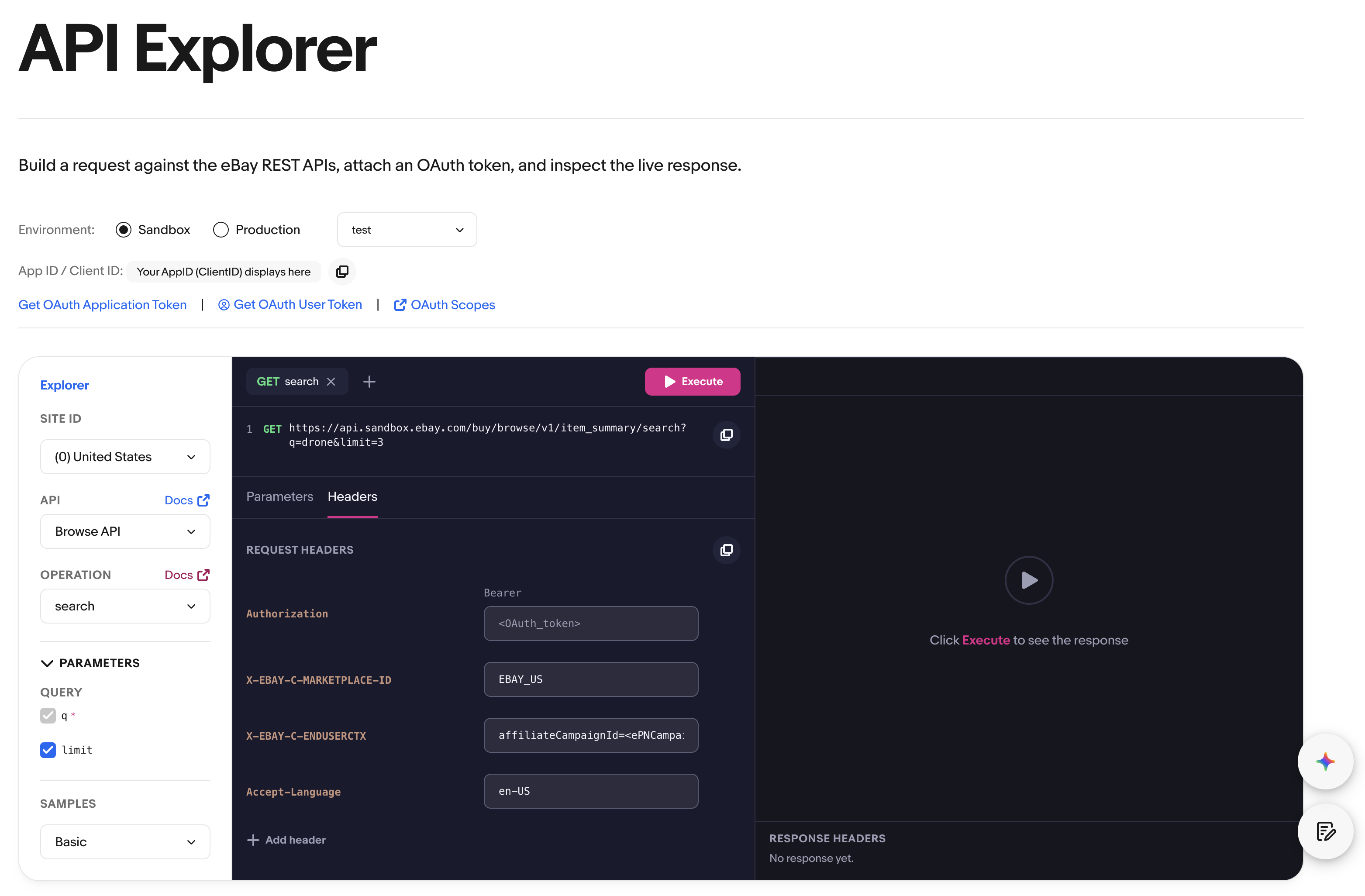
If you need a user access token:
-
Select Get OAuth User Token to go to the eBay sign-in page for the selected environment.
-
Complete the user consent web flow to authorize your application to act on the user's behalf.
-
When you get consent, the user access token is generated and added to the Authorization field under the Headers tab of the request panel.
Step 3: Configure the request
-
At the left side of the API Explorer, under Samples, select the dropdown to see a list of the preconfigured samples available for the selected call, then select one.
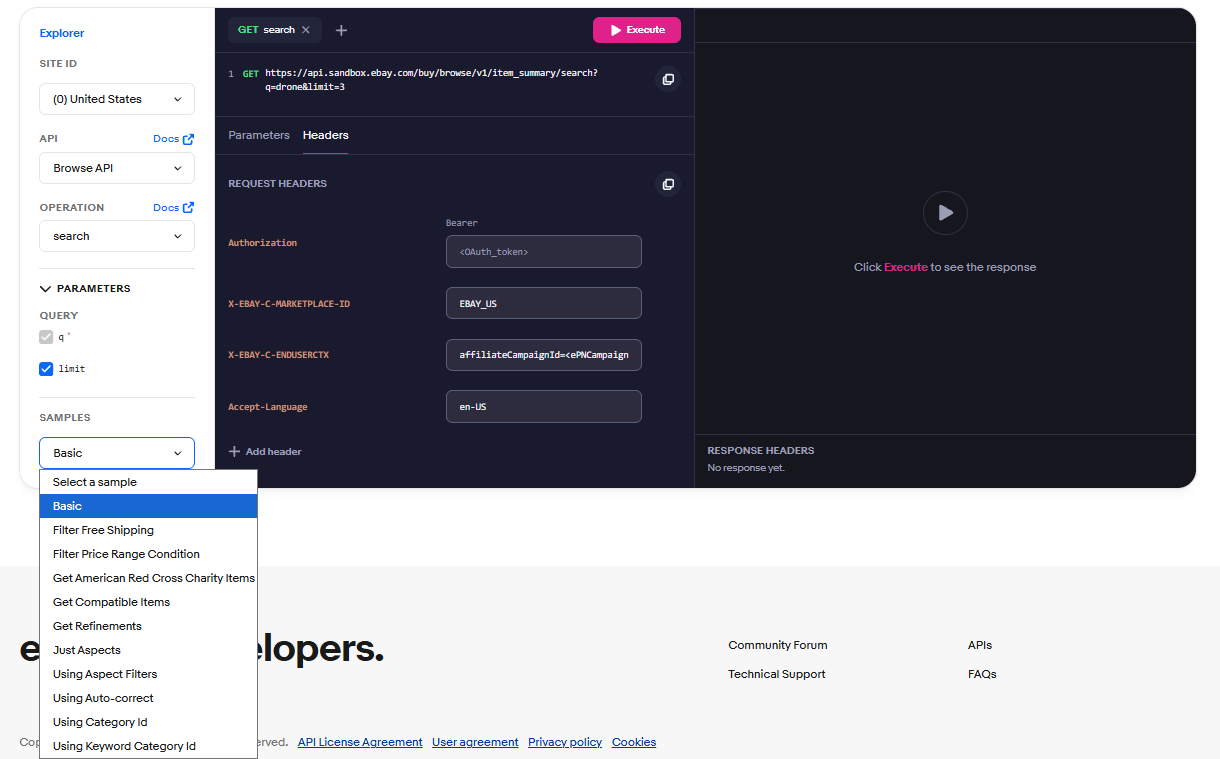
-
Edit the selected sample to configure any aspect of the request.
Because many of the methods in eBay APIs are sequential in nature and many of the required identifiers are personal to each eBay user, many of the preconfigured samples require you to configure the request before you can make the call.
For example, if you're trying to get the details on a fulfillment policy with
GET /fulfillment_policy/{fulfillmentPolicyId}, you need to supply the fulfillmentPolicyId for your own policy that you want to inspect.-
Review the endpoint for the selected sample and make sure you have supplied valid values for any placeholders, such as curly braces ( { } ) or angle brackets ( < > ), in the URL.
-
If the method you're calling uses query parameters, set and customize these query parameters based on what you want to test. Multiple samples are often provided for methods with query parameters, and these samples demonstrate the proper syntax to use when using these parameters.
-
If your method employs a request body, replace any variables in the sample request with valid values. Variable placeholders are often signified as variable names placed within curly braces ( { } ) or angle brackets ( < > ). Replace the entire string, brackets and braces included, with the values you want to use for your test call.
-
Step 4: Make a request
-
Check that the following request parameters and payload are set correctly:
-
Token (in the Authorization field, under the Headers tab)
-
URI
-
Request payload (if applicable)
-
HTTP headers
-
-
Select Execute.
If the request is successful, the Call Response section shows the expected response payload in JSON (RESTful APIs) or XML (Traditional APIs) format.
If the request is unsuccessful or only partially successful, an errors array (for RESTful APIs) or an errors container (for Traditional API APIs) is included that identifies one or more issues with the request. Note that some methods only return an HTTP status code and have no response payload associated with them.
Get supportUse eBay OpenAPI specs, SDKs, widgets, and WSDLs
eBay OpenAPI specifications
OpenAPI Specification (OAS) is available for all of our RESTful public APIs. You can download OpenAPI contract for eBay APIs, generate clients in one of 40+ supported programming languages, and successfully invoke an eBay API in minutes. For more information and a video to see a demonstration of how OpenAPI-based contracts can speed up API integrations, see /news/openapi-coverage.
eBay SDKs, widgets, and WSDLs
Explore our SDKs, widgets, and WSDLs to learn how to make your application development easier.
SDKs for eBay APIs
SDKs (software development kits) are designed to make application development easier and more efficient. SDKs are downloadable kits that include precoded solutions for common programming tasks in a language you already use.
SDKs help simplify some common programming tasks, such as error handling and call retry. Learn more about all eBay SDKs.
Customizable widgets
eBay widgets are customizable, reusable components powered by eBay APIs that make it easier for you to add certain functions to your application.
Learn more about eBay widgets.
WSDL to create client stub
Just like every RESTful API has OAS contracts available for download, every traditional API has an XML-based WSDL available that will help a user get up and running making API calls. The location of the WSDLs for each API can be found on the "Making a Call" page of that API's documentation set. For the Trading API, Select this link to download the latest WSDL.
Use the WSDL pruner tool to prune a copy of the eBay Trading WSDL to reduce the operational size of the WSDL.
Get support
The eBay Developers Program offers several support resources to help you through the development process, including understanding the support offered, how to activate support, and how to submit a support request.
Activate developer account support
Activating support allows you to interact with the eBay Developer Technical Support (DTS) team. You must activate support for at least one of your contacts before you can get account support or apply for an application growth check.
To activate developer support:
-
Log into your Developer account and go to your Profile & Contacts page.
-
From the Primary Contact section, ensure your name, email, phone, and country are filled out. If not, select Edit, complete these fields, and select Save.
-
Select Edit.
-
Select Activate Support.
APIs updates
Frequently check the API Updates page for articles related to API product updates and announcements, site banners that alert to critical notices, release notes for all eBay APIs, listings for API methods or capabilities that have been scheduled for deprecation, newsletters, and blogs.
Developers Community Forum
Interact with and ask questions to the eBay developer community using the eBay Developer Forums. Forums are split into various categories that include Buying, Selling, Search and include forums focused on specific APIs. Participating on the eBay developer forums is free of charge.
Developers Technical Support
Formal eBay support comes from the Developer Technical Support team. You must be a registered eBay developer with active support to interact with Developer Technical Support. If you exhaust your ability to debug your application, or if you think you have encountered a bug in an eBay interface, you can contact Developer Technical Support for help.
Create a support request
To create a support request, go to the AI-Assisted Support tab of the Developer Technical Support page and use AI-Assisted support feature to create tickets.
Additional Help Resources
In addition to the resources that directly support your eBay application development, the following resources provide details on the rich eBay feature set:
-
eBay Buying Customer Service Help pages—Business support page that provides information on buying, such as how bidding works, payments, shipping and tracking items, managing purchases, and working with sellers
-
eBay Seller Center—Business support page that provides sellers with information on listing and marketing, running a store, shipping, and service and payments
-
eBay Customer Service Help—eBay's primary customer support page
-
eBay Policy Index—Index page of eBay's buying and selling policies
-
eBay Motors Support—Business support page for eBay Motors
Secure your application
When developing an application, you need to be security-aware. Applications often request, reference, or otherwise use data such as:
-
Credit card or other payment credentials and information
-
User's personal identifying information, such as names, addresses (email and physical), phone numbers, and so on
-
Application credentials and tokens
-
Business intelligence data, such as order sizes, sales data, and other information that has the potential to be misused by competitors and other businesses
As an application developer, you're responsible for securing your users' data and accounts. You're expected to follow the OWASP secure coding principles (or OWASP Cheat Sheet) and address the OWASP Top 10 Most Critical Web Application Security Risks.
The subsections below describe the eBay-specific actions that are either expected of you and your application or are generally good security practices to follow.
Credentials and token management
-
You are expected to use the eBay-provided secured and authenticated services to perform user authentication with eBay.
-
Encourage users to reset their passwords if they suspect their sign-in credentials are compromised.
-
Periodically reset your cert ids (client secrets) and if there is a cert ID breach, ask eBay Developer Technical Support to revoke any active tokens. Active tokens can exist for a considerable post-reset period.
-
Never send cert IDs via email to anyone including eBay employees.
Authentication and authorization
-
Force a complex password policy and use anti-automation to avoid credential stuffing attacks.
-
Usage of strong authentication mechanisms involving 2FA / MFA are recommended.
-
Require input validation on both the client and server side of your application.
-
Use role-based authorization with least privileges as default.
Session management
-
Invalidate any session identifiers after a successful logout or timeout on both the server and client sides.
-
Always assign a new session ID after a successful authentication.
-
For cookie-based sessions, ensure no sensitive information is added to the cookie. Instead, always use a random session ID and ensure proper cookie security is followed.
Data protection
-
Encrypt or hash all sensitive data in transit or at rest.
-
Ensure you use NIST-recommended strong cryptographic algorithms.
Communication and HTTPS
-
Always send data via HTTPS, especially PCI data.
-
Perform all sensitive data read/writes over HTTPS.
-
Don't use a weak SSL implementation. Use strong configuration with the latest protocols, ciphers, and certificates.
-
Remove all sensitive data from GET requests. Use other HTTP methods for update/delete operations.
-
Maintain strict HTTPS hygiene by using the HSTS security header.
Security best practices
-
Perform regular security assessments of your application and fix all security issues.
-
Ensure rate limiting of sensitive and highly used front end pages to prevent volumetric attacks.
-
Ensure all user input is validated and output is properly encoded based on context.
-
Ensure servers don't disclose information technology used or version information.
-
Errors, stack traces, and debug information must not be displayed to the user on the web page.
-
Ensure no sensitive information is logged into Application and System logs.
Best Practices
As you develop your application, it's a good idea to follow these practices:
-
Use existing valid access tokens instead of creating new tokens.
-
Use the modern and RESTful APIs when developing your application. Some benefits include:
-
HTTP is widely used, so sending and receiving HTTP requests and responses doesn't require much bandwidth.
-
JSON and URL addressing protocols are used, which minimizes the work needed to get your application up and running since all APIs of this type have the same easy-to-learn interface format.
-
-
To make efficient use of your API calls, cache data locally and avoid retrieving duplicate data multiple times.
-
Follow the best practices (if any) that eBay defines for each call. For example:
-
Use calls that return more data. Some APIs include several calls that provide similar services. Using calls that return more data reduces the number of calls you need to make and makes your application more efficient.
-
Use filters to retrieve incremental updates for calls that return large result sets. Certain calls, such as those related to getting category information, return large result sets. If the data includes historical information or information that doesn't change frequently, we recommend that you store all the data initially, and then use filters to only retrieve incremental updates.
-
Subscribe to order-related platform notifications to reduce the number and frequency of order retrieval calls. For example, eBay can send you a notification when a fixed-price listing generates a sale or an auction listing ends.
-
-
As with all applications, your application should implement at least basic error handling.
-
Build flexibility into your application and stay up to date with API-specific release notes.
Because we support several versions of an API at any given time, you have more time to adapt to changes made to the eBay website. You don't have to upgrade each time a new version of an API comes out, but you might be interested in new features and changes to functionality that you currently use. We also limit support for outdated functionality. Regularly check the API release notes and API updates to stay current.
-
Understand when listing-related fees are charged.
All seller fees that apply when a seller lists an item through a UI, tool, or mobile application also apply when an application lists an item through an API. We recommend that you design your application to inform users when they will be charged additional fees. If using the Trading API, consider using “verify” calls instead of add, revise, and relist item calls. Verify calls provide the same validation but don't actually publish,update, or relist an item. So they return the same errors or warnings and also show the applicable fees that will be charged to the seller if the listing is published, updated, or relisted.
-
Consider providing a Sign-in with eBay option to create a great user experience.
Request an application growth check
The application growth check is a free service that the eBay Developers Program provides to its members. During the application growth check process, we critically review all new applications for compliance with the application growth check requirements, at no cost to you.
Requesting an application growth check is required if you want to:
-
Increase the API call limits for your application
-
Use restricted APIs in production
The following lists some helpful recommendations to review before you submit an application growth check request:
-
Application readiness—You'll need a working application that we can test to ensure it complies with the requirements for the application growth check. Be sure to follow the guidelines below as you create your application.
-
API license and eBay policies—Check that your application complies with:
-
The eBay API License Agreement. This includes, but isn't limited to, how your application:
-
Collects statistical or other information related to specific eBay users, groups of eBay users, or types of eBay users.
-
Derives conversion, completion, or success rates, unless the information is specific to the user logged into your application and only to be shown to that user.
-
Estimates or displays reserve auction prices of other users.
-
Derives sales or activity rates for listings with specific features or enhancements, unless the information is specific to the listings created by the user logged into your application and only for that user's view.
-
Displays a user's private profile or detailed feedback information, unless the information is specific to the user logged into your application and only to be shown to that user.
-
Collects statistical data about eBay.
-
Derives average selling price or gross merchandise value for any eBay category.
-
-
Consumer protection and privacy laws
-
The eBay User Privacy Notice
-
-
Technical best practices—Ensure that your application:
-
Follows the OWASP secure coding principles. Learn about web application vulnerabilities and how to protect against them in the OWASP "Top Ten".
-
Uses the UTF-8 encoding scheme (not ISO-8859-1). See Working with UTF-8 in the eBay developer's knowledge base.
-
Uses the latest versions of the APIs. Go to the API documentation and view the release notes for the APIs you're using to find the latest versions. When you submit your information, you'll need to specify which version of each API your application is using.
-
Handles errors gracefully and implements retries correctly. In particular, implements retries for a maximum of two times for infrastructure errors. Errors that are returned from calls must include useful details and instructions for both end users and applications.
-
Limits the volume of data returned by asking only for the required amount of information and doesn't make calls more frequently than necessary. eBay reserves the right to restrict an application's polling frequencies for any calls. This type of restriction typically occurs when eBay determines that an application is causing a negative operational impact to the eBay site.
-
Doesn't collect eBay usernames and passwords from your customers. If your application uses APIs that require user authentication (some APIs don't), it must retrieve user access tokens: OAuth tokens for RESTful APIs and OAuth or Auth'n'Auth tokens for Traditional APIs.
-
Recovers gracefully when the number of items returned per page changes. Some calls return multiple items in response to a single call. eBay reserves the right to change the maximum number of items returned per page.
-
-
If you have a web application, it doesn't put eBay web pages served by eBay servers in an iFrame.
-
If you have a desktop application with an embedded browser and your application displays an eBay web page served by eBay servers, your application displays the complete URL of the page.
-
If you have a search application, it uses the Buy API or Finding API.
Apply for the application growth check
-
Make sure you've completed everything on the application growth check checklist.
-
If you haven't already done so, activate developer account support.
-
In MyAccount, go to the App Growth Check tab.
-
Preview and prepare answers to all the questions in the application growth check form, including your estimated call peak, both hourly and daily volume, for each of the API calls in your application.
-
Complete the form, filling in all required fields marked with a red asterisk.
-
If you need more information about a field, hover your cursor over the Information symbol next to the field.
-
Select Save as Draft to stop and save your progress at any time.
-
-
When you're finished, select Submit.
Use the application growth check to get access to restricted APIs
You must request an application growth check if you want to use restricted APIs in Production. The check is done by the eBay team as a final step before allowing your Production keyset to access restricted APIs.