Using eBay GraphQL APIs
Overview
GraphQL is a query language released as an open-source project that provides an efficient and flexible API architecture. You can create and execute queries by using a type system you define specifically for your data. For additional information about using GraphQL as a client, see Introduction to GraphQL.
The eBay GraphQL is served and consumed over HTTP. This maximizes compatibility for clients, servers and tools, and aligns closely with the draft specification GraphQL over HTTP.
Benefits
GraphQL is particularly beneficial where bandwidth is a concern or flexibility is important:
- Declarative data fetching: Clients can request exactly the data they need, nothing more and nothing less (eliminates over-fetching or under-fetching data)
- Single endpoint: Exposes a single endpoint which handles a wide variety of queries and mutations.
- Strongly typed schema: Defined by a schema that specifies the types of data, which serves as a contract between the client and server.
- Efficient data loading: Optimizes data retrieval by allowing clients to specify their data requirements which reduces the amount of data transferred over the network and improves application performance.
- Flexibility and evolution: Enables APIs to evolve without breaking existing queries. New fields and types can be added to the schema without impacting existing clients.
Authorization
Clients must provide a valid token in the Authorization header. To understand which OAuth scope to use to access objects, queries, and mutations in GraphQL, refer to the specific eBay GraphQL API's reference documentation.
Note: Tokens issued for use with the FGQL public API may be up to 4,000 characters in length. We recommend allocating a minimum of 4,000 characters in any implementation that stores or processes these tokens (e.g., database columns, environment variables, HTTP header buffers, string fields).
For information on how authorization works for eBay APIs, see the Authorization Guide.
Understanding eBay GraphQL Schema
Note: For a basic understanding of GraphQL, familiarize yourself with GraphQL concepts such as queries, mutations, and types. For additional information, see Introduction to GraphQL.
Schema
The eBay GraphQL server does not support schema introspection, but documentation is provided in the schema (self-documenting). See the schema in the specific API's reference documentation for details.
Versioning
The eBay GraphQL API is versionless, meaning that there is no need for developers to specify a version number when making API requests. This approach ensures that users always have access to the latest features and improvements without the need to manage version upgrades. The API is continuously updated, and backward compatibility is maintained to ensure existing queries and mutations continue to function as expected.
URL
The eBay GraphQL API is located at: https://graphqlapi.ebay.com/graphql
Serialization format
Requests and responses are serialized as JSON strings.
Clients should expect to receive responses with the following Content-Type header: Content-Type: application/json
Note: The eBay GraphQL API does not support the application/graphql-response+json content type.
Request components
Query
Each query must be a POST request (GET requests are not accepted) and contain the required request headers and the request body. Also, make sure the request contains the query in a serialized string (required for GraphQL over HTTP). See Request body for more information.
Mutation
Each mutation must be a POST request and contain the required request headers and the request body. Also, make sure the request contains the query in a serialized string (required for GraphQL over HTTP).
Request headers
All requests made to the eBay Public Federated GraphQL Gateway operations require you to provide the Authorization HTTP header for authentication authorization. You can find general information about HTTP request headers used by eBay in HTTP request headers.
Note: JSON is the only format returned in response bodies (any accept header in the request is ignored).
The following request headers are required by eBay GraphQL operations:
Header | Description |
| The Authorization header specifies the OAuth token and token type used to authorize the request. You must supply this request header in each request you make to the eBay Public Federated GraphQL Gateway interfaces. For details, see OAuth access tokens. Example: Bearer <accessToken> Occurrence: Required |
| This header identifies the eBay marketplace to use. See Marketplace ID values for full list of marketplace ID values. Example: EBAY_US Occurrence: Required |
| This header indicates the content type used in the request payload. Example: application/json Occurrence: Required |
Request body
The request body, often called a payload, is typically required for both operationtypes, which include queries (retrieving information) and mutations (creating, updating, or deleting information). In the eBay GraphQL APIs, all request payloads and response payloads are formatted in JSON. See the GraphQL API reference documentation for definition of the fields supported in the body for each operation.
Note: Make sure the request contains the query in a serialized string.
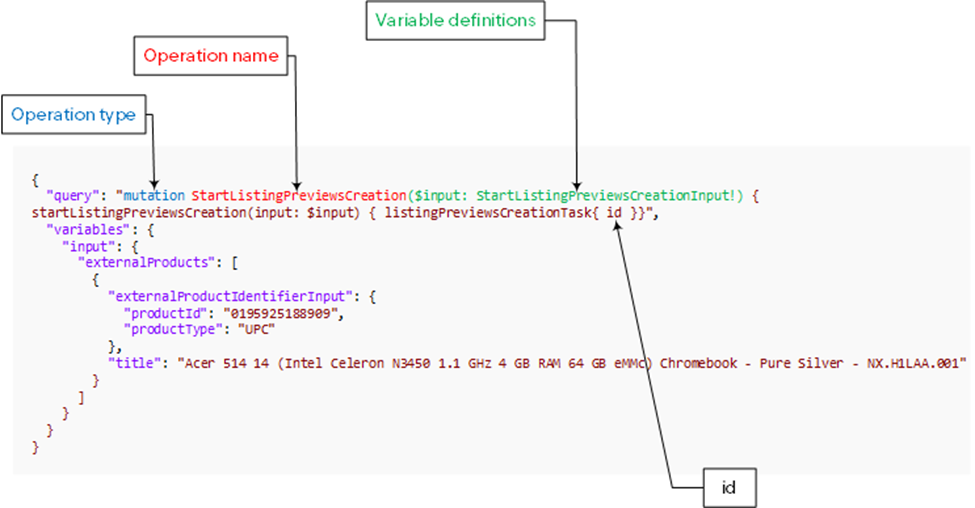
The following code shows an example JSON payload for an eBay GraphQL mutation operation, a call that initiates a process that uses seller provided external product data to create an eBay Listing Preview and returns its id. The request defines the query and also any variables to use. The query includes a serialized string defining the Operation type, Operation name, Variable definitions, and also any returned fields such as id. The variables include definitions for values for any variables defined by the operation in its Variable definitions. The eBay GraphQL does not provide for extensions in the request, but may return them for errors in the response (see Extension object format).
Input variables
We support GraphQL input arguments only through variables. Inline/literal input values within the GraphQL operation are not supported.
Supported
query GetItem($itemId: ID!) {
  item(id: $itemId) {
    title
  }
}
{
  "itemId": "123456789"
}
Not supported
query {
  item(id: "123456789") {
    title
  }
}
Using variables keeps the GraphQL operation separate from request-specific data. This promotes operation reuse, consistent input validation, cleaner handling of complex inputs, and avoids dynamically constructing query strings. The GraphQL specification also recommends variables for parameterizing reusable operations and avoiding runtime string construction.
For more information about input variables, see Graph QL - Variables.
Response components
The eBay GraphQL responses contain the main components of data and any errors if encountered, but do not contain the extensions field at the main level. However, if errors were encountered, the errors field may contain the extensions field, as well as the message and locations fields. These fields may provide additional information about the error.
Response headers
The eBay GraphQL APIs respond with a Content-Type header set to application/json. Please note that the APIs do not return responses with a Content-Type header of application/graphql-response+json. You can find general information about HTTP response headers used by eBay in HTTP response headers.
Response body
Note: Responses will not contain the extensions entry other than in errors.extensions.
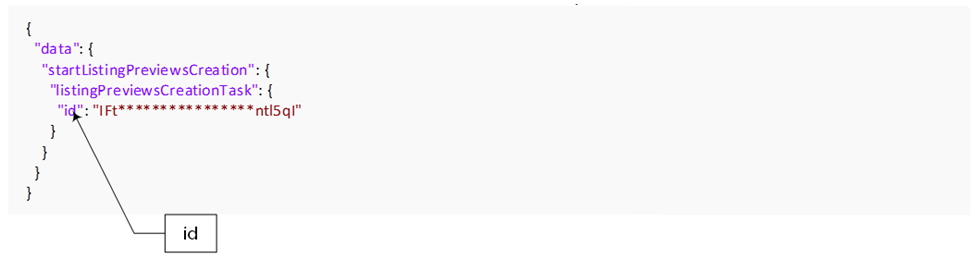
The response body, often called a "payload," for a successful call returns the fields defined in the operation’s request. The following example shows an JSON payload response for an eBay GraphQL mutation operation which returns its id that was specified in the associated request.
HTTP status codes
GraphQL status codes differ from REST status codes. One main difference is that in GraphQL errors a 200 response may contain errors. If the response contains a data key that is not null, a 200 response is returned. For example, in the scenario of calling ListingPreviewsCreationTask that returns a ‘Too many requests error’, a 200 status code is returned and a data key value pair. In this example, the data key value includes the key listingPreviewsCreationTaskById and its value (which may be a null value). A 200 HTTP response is typically returned for every well-formed GraphQL request, even if there are errors during execution. A status code other than 200 usually indicates that the client has sent a malformed request. The 200 status code is returned even when the response contains only the errors section. When troubleshooting errors, make sure to check any returned error parameters. See Errors for additional information.
Errors
The eBay GraphQL APIs follow the errors field and the error result format specified in the GraphQL specification.
The errors field is an optional field that appears if there were errors encountered during the execution of the query or mutation. It is an array of error objects, each providing details about a specific error. Each error object typically includes:
- message: A human-readable description of the error.
- locations: An array indicating where in the query the error occurred, specified by line and column numbers.
- path: An array representing the path to the field in the query where the error occurred.
- extensions: An optional object that may include additional custom error information.
Extensions object format
The eBay-specific error fields are consistent with existing eBay APIs.
{
  "errors": [
  {
    "message": "(string)",
    "locations": [(Location)],
    "path": [(Path)],
    "extensions": {
      "code": (long),
      "domain": "(string)”,
      "category": "(CategoryEnum)",
      "remedy": "(string)",
      "parameters": [(Parameter)]
    }
  }
  ]
}
Extensions object fields
The eBay-specific error fields are defined in the following table:
Field | Type | Description |
|---|---|---|
code | long | A numeric code that is guaranteed globally unique. Occurrence: Always |
domain | string | Name of the domain containing the service or application. Occurrence: Always |
category | string | The category type for this error.
Occurrence: Always |
parameters | array | This optional complex field type contains a list of one or more context-specific ErrorParameter objects, with each item in the list entry being a parameter (or input field name) that caused an error condition. Each ErrorPrameter object consists of two fields, a name and a value. Occurrence: Conditional |
More about these fields is documented in the eBay Developer Program article, Handling Errors. Also see the Related topic API Response Status Errors.
API error and warning responses
The GraphQL Specification specifies an exact error structure with the fields message, locations, and path. See Error Result Format in the specification.
Developer tools
Try out the Inventory Mapping API using the GraphQL Explorer. The GraphQL Explorer is a tool that allows you to run calls to test the Inventory Mapping API in the Sandbox or Production environment. You must be signed in to your developer account to use the GraphQL Explorer. For more information, see Use the API Explorer to try out APIs.