XML Flow Tutorial: Getting Tokens
This tutorial demonstrates how an application gets an Auth'n'Auth token for a user.
Authorizing the calls you make
You can authorize the calls you make to the eBay APIs using one of two methods:
- Auth'n'Auth – The traditional authentication and authorization technology used by the eBay APIs.
- OAuth – An industry standard authorization technolocy that is supported by many eBay APIs, including several of the traditional eBay APIs.
This tutorial covers how to configure and use Auth'n'Auth.
For details on using OAuth, including which tradtional APIs that support OAuth, see: OAuth access tokens.
Getting and using Auth'n'Auth tokens
The first step is the preparatory setup that enables an application to receive user tokens. This setup is done on the eBay Developers Program site (developer.ebay.com).
The second step involves interactions between an application and a user:
- Magical Bookseller, a fictitious seller who wants to use a listing application for her eBay inventory
- MagicLister, a fictitious listing application that needs to get a token in order to help Magical Bookseller list her inventory on eBay
The application makes several API calls to eBay during the process of getting a token. When a step includes an API call, it provides a link to XML call samples in the Trading API Reference. The samples show how to perform those steps using the API.
What this Tutorial Covers
This tutorial contains the following sections:
- Complete Source Code
- Before You Begin
- Step 1: Setting Up an Application to Receive Tokens
- Step 2: Receiving a Token for a User
- Notes and Next Steps
Complete Source Code
The API Flow tutorials use raw XML requests and responses. The XML call samples described in this tutorial can all be found in the Trading API Reference.
Before You Begin
All the calls in the tutorial are performed in the Sandbox environment, using a test user and the API Test Tool. If you want to perform the steps in this tutorial for your own application in the Sandbox, you'll need to do the following:
Requirements for this tutorial
- Join the eBay Developers Program and get your application's Sandbox keyset.
- Create your own Sandbox test user, equivalent to the testuser Magical Bookseller used in this scenario, with a Sandbox authentication token. See Create a test Sanxbox user in the Get Started with eBay APIs guide for more information.
- Have an application that can respond to web-based user actions and receive responses to calls it makes to eBay servers.
The tutorial has no specific code requirements. After you log in, you can run the XML samples in the API Test Tool on the eBay Developers Program website.
Step 1: Setting Up an Application to Receive Tokens
Typically, an application needs to be set up to receive tokens only once. The following is for Web/Server based applications. For information about Client/Desktop applications, see Client/Desktop Applications.
This section shows how the developer of MagicLister uses the screens on the Application Keys page to generate an eBay redirect URL name that MagicLister will use in the token generation process, and configure the eBay consent form that MagicLister's subscribers will use to grant MagicLister tokens.
- The developer signs in to https://go.developer.ebay.com and goes to his Application Keys page.
The Sandbox environment is used for testing, and the Production environment is used to set up an application for eBay users. In this example, we used Sandbox.
-
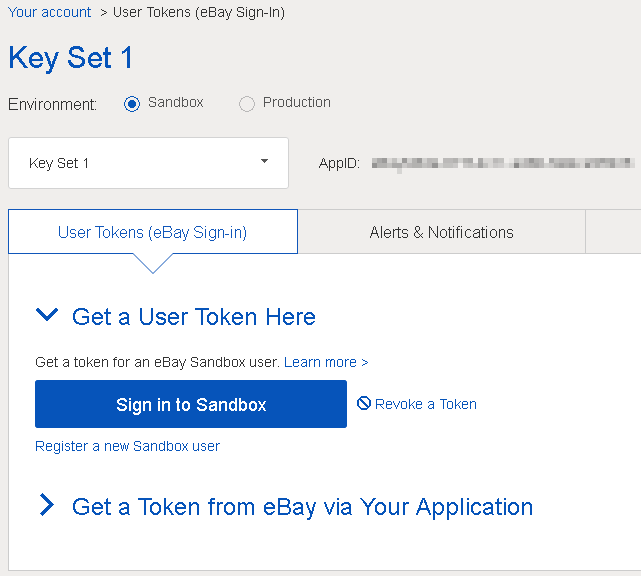
In the App ID row of the Sandbox keyset, the developer clicks User Tokens to access the Tokens page for your Sandbox keyset.
-
He clicks Get a Token from eBay via Your Application. In the Your eBay Sign-in Settings section, he clicks Add eBay Redirect URL.
The generated redirect URL name and the sign-in consent configuration form appear. A redirect URL name contains settings that govern:- The content that users will see on the consent form
- Rules about how the application authenticates users and gets tokens
- Application URLs such as the AcceptURL that eBay uses to return consenting users to the application
-
In the form on the left, he enters the application display title and URLs that will be used in the sign-in consent form. On the right is a live preview of the consent form, which is automatically updated to reflect the entries on the left:
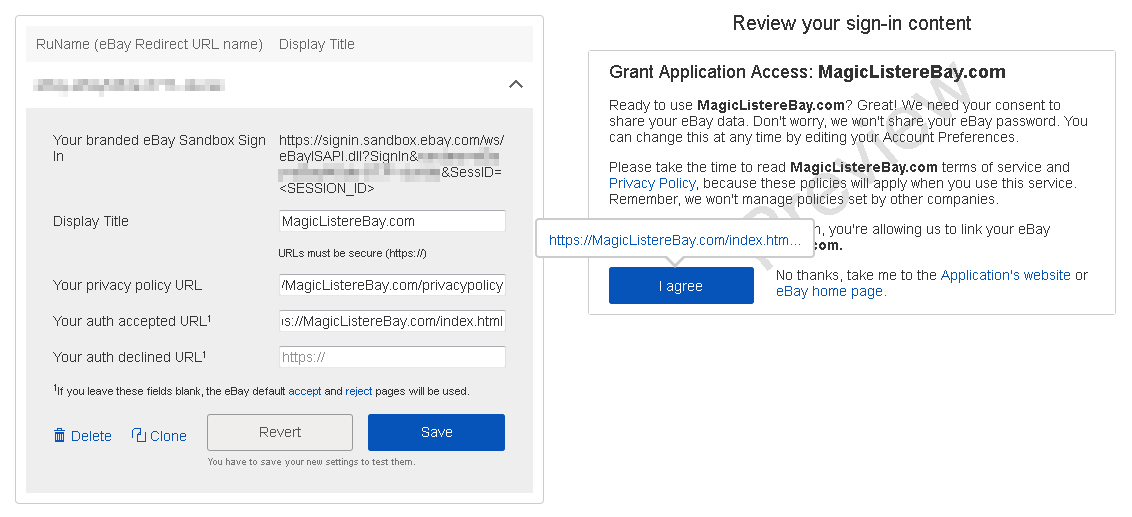
- Display Title: the company or application name to be displayed on the consent form.
- Your privacy policy URL: the URL at which your application's privacy policy can be read.
- Your auth accepted URL: the URL to which users will be directed after they consent to the web application authenticating them.
This URL must support SSL and must use the HTTPS protocol. If your application is capable of serving web pages, you should provide your own web page and set this URL. If your application cannot serve web pages, this URL defaults to a standard eBay accept-response page (the eBay page and URL are subject to change by eBay). - Your auth declined URL: the URL to which users are directed when they do not consent.
If your application is capable of serving web pages, you should provide your own web page and set this URL. If your application cannot serve web pages, this URL defaults to a standard eBay accept-response page (the eBay page and URL are subject to change by eBay).
- When the developer is satisfied with the redirect URL name settings, he clicks the Save button.
- In the Your eBay Sign-in Branding section, the developer provides branding content for his application:

- Add Image: click the icon and upload a logo image to be displayed on the consent form.
Acceptable formats for application logos include JPG, GIF, PNG, BMP, and TIF image files. JPG is recommended. If you use PNG, it will be converted to JPG (or GIF) format. The maximum file size is 7MB. eBay Picture Services (EPS) downscales and compresses the picture to store it at the different sizes in the imageset. For best results, upload a picture that has a minimum of 1000 pixels on the longer side. You can upload multiple images, but only one can be selected to display on the consent form at a time. - About URL: the URL at which users can learn about your application.
- Enable Application Branding: check this box to use the selected logo image and the About URL on the consent form.
- Add Image: click the icon and upload a logo image to be displayed on the consent form.
- After making changes, the developer clicks Save Branding.
The MagicLister application is now set up to start getting tokens.
Step 2: Getting a Token for a User
This section shows:
- How the seller, Magical Bookseller, interacts with the application site and the eBay site to grant a token to the application.
- How the application, MagicLister, fetches the token.
- Magical Bookseller goes to the MagicLister site, where she clicks a Subscribe button or otherwise lets the application know that she intends to use it.
-
MagicLister sends a GetSessionID call to eBay, with the MagicLister redirect URL name.
This call will retrieve a SessionID that will identify Magical Bookseller after she signs in to eBay. For an example of the GetSessionID request and response, see the GetSessionID samples. -
MagicLister URL-encodes the SessionID and then constructs a URL containing the SessionID and the redirect URL name, and uses this URL to send Magical Bookseller to the eBay Sandbox sign-in page.
In this scenario, the GetSessionID call was made using the API Test Tool, and the SessionID was pasted into a URL along with MagicLister's redirect URL name, in a browser window.
The URL takes this form:https://signin.sandbox.ebay.com/ws/eBayISAPI.dll?SignIn&RuName=YourRUnameHere&SessID=YourSessionIDHere
-
Magical Bookseller signs in to eBay.
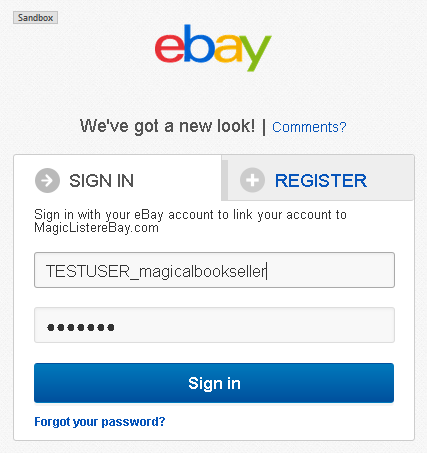
- eBay sends Magical Bookseller to the user consent form that MagicLister configured in the application settings tab, in the first section of this scenario.
- When Magical Bookseller clicks the I agree button, eBay sends her to MagicLister's "auth accepted" URL.
-
When Magical Bookseller arrives at the "auth accepted" URL, MagicLister sends a FetchToken request to eBay with the SessionID to retrieve the token, as shown in this sample. MagicLister includes its credentials in the HTTP header with this FetchToken call — the App ID, the Dev ID, and the Cert ID. That's because this is one of the few authenticated user-related calls that you make when you don't already have a token.
Note: With most other calls, instead of the keys, you include the token in the RequesterCredentials container. If you're using SOAP, RequesterCredentials needs to be in the SOAP header; for XML you include RequesterCredentials in the request payload. For more information about how this works, see Security on the Trading API's Making a Call page. -
FetchToken returns a user token for Magical Bookseller to MagicLister.
MagicLister saves the token and the token expiration date from the FetchToken response. - MagicLister tests the token by making a GetUser request using the new token.
Notes and Next Steps
This section contains notes about the tutorial and suggestions for extending it.
What's Next
Here are some suggestions for ways you could modify or extend the tutorial to learn more about the API:
- Try other calls for the user: Listing an Item, Buying an Item, or Completing a Sale.
- Try the procedure with your application in Production: create a test user, subscribe it to your application, and get a token for the user.
Additional Resources
You can find information about eBay SDKs on the eBay Developers Program website at SDKs and Widgets | eBay Developers Program. This page provides comprehensive details on the SDKs available for various programming environments, such as .NET and Java, which can simplify the process of integrating eBay functionalities into your applications.
More information about the Trading API is available at these locations: