findItemsByKeywords
Note: All calls in the Finding API have been deprecated and will be decommissioned on February 5, 2025. An alternative to this API is the Browse API, which also has advanced search capabilities.
This call searches for items on eBay by a keyword query (keywords).
Usage Details
The response contains details about items matching the search criteria. By default, eBay returns a specific set of data in the response to your call. findItemsByKeywords lets you refine your search results using item filters (itemFilter) and aspect filters (aspectFilter). Use paginationInput and outputSelector to control the amount of data returned from each request. Results are sorted by Best Match by default, with the most relevant items listed first. Use sortOrder to specify a different sort order, such as sorting by current price or the listing end time.
The following sections detail how to control the information returned in the response sets:
- Specifying the eBay Site
- Controlling Results with Item Filters
- Refining Results with Aspect Filters
- Finding Local Items
- Expanding Output Data with outputSelector Fields
- Sorting the Output
- Paginating the Results
- Specifying Affiliate Details
Specifying the eBay Site
The GLOBAL-ID URL parameter (or X-EBAY-SOA-GLOBAL-ID HTTP header) specifies the eBay site to use for searches. When specifying a global ID (e.g., EBAY-DE for the eBay Germany site), the search response contains only items available on the site specified. If you do not specify a global ID, eBay uses the US site (EBAY-US) by default.
For more information about URL parameters and HTTP headers, see Making a Finding API Call.
Controlling Results with Item Filters
Filters provide you with control over search results by narrowing the range of items returned. The itemFilter container uses name/value pairs to describe specific filters. You can specify filters for variety of properties, including the item condition, number of bids, price range, listing type, and so on. All item filters are optional input parameters.
For example, the following URL-formatted filter specifies that items returned in the result must have free shipping:
...&itemFilter.name=FreeShippingOnly&itemFilter.value=true...
Some filters take additional parameters. For example, when using the MaxPrice or MinPrice filters, you can specify the currency value with itemFilter.paramName and itemFilter.paramValue. When you use MaxPrice and MinPrice item filters, itemFilter.paramName defaults to Currency and itemFilter.paramValue defaults to USD.
If you specify multiple item filter name/value pairs in a URL message format, you must specify the multiple filters using array notation, as shown in the following example:
...&itemFilter(0).name=FreeShippingOnly&itemFilter(0).value=true&itemFilter(1).name=ListingType&itemFilter(1).value=FixedPrice...
For more details on how to use item filters, see Refining a Search with Item Filters in the User Guide. See the ItemFilterType type documentation for more information about the allowed values, usage rules, and dependencies.
Refining Results with Aspect Filters
Aspects are well-known, standardized characteristics of an item. For example, "Style," "Color," and "Shoe Size" could be aspects of Men's Shoes. Aspects can vary for different kinds of items—the aspects of Men's Shoes are different from those of Digital Cameras (aspects for Digital Cameras might include "Optical Zoom" and "Megapixels"). Categories are a buy-side grouping of items, such as shoes or digital cameras.
Aspect information can be used to create filters to refine your search results. To see aspects in action, a search request on the eBay site often displays aspects and their respective aspect values on the left-hand side of a search result page. Aspect values are the details of the aspect. For instance, Optical Zoom might have an associated aspect value of "10x." eBay determines aspect values from listing properties such as item specifics, titles, and subtitles.
When searching for items with one of the Finding API calls, you can request that an aspect histogram to be returned in the result. In a URL request, specify outputSelector=AspectHistogram. The resulting aspect histogram provides information you can use to refine your search. The histogram lists the aspects for the category that are most pertinent to your search. In addition, for each aspect, all the associated aspect values are listed with the number of active listings that match that given aspect value. For example, "Athletic" or "Dress Shoes" could be aspect values associated with the "Style" aspect of Men's Shoes.
Aspect filters consist of an aspectName, and one or more aspectValueName values. Find the values for each of these fields in the aspect containers returned in a query response that has aspect histogram values. For example, the following shows a URL-formatted aspect filter using values taken from a previous search response:
...&aspectFilter.aspectName=Sub Style&aspectFilter.aspectValueName=Running Shoes...
See aspectFilter for more information.
| Note: Starting October 2014, domains will be deprecated.
This call will continue to accept requests containing references to domains (such as domainFilter) and will continue to return references to domains (such as domainDisplayName). The behavior will differ, as follows, depending on the fields specified in the request/response.
|
To refine a search by category, use findItemsAdvanced and the categoryID field.
Finding Local Items
You can specify buyerPostalCode for distance-based searching. Find items located close to you by specifying buyerPostalCode and setting sortOrder to Distance. The following sample will sort matching items in the results with items closest to the buyer's postal code listed first:
...&buyerPostalCode=9***5&sortOrder=Distance...
You can locate items that have been listed for local-markets only by specifying a buyerPostalCode and item filters for LocalSearch and MaxDistance. The following sample returns only the items listed for both for local markets and are located within a 100-mile radius of the buyer's postal code (wrapped for readability):
...&buyerPostalCode=9***5&itemFilter(0).name=LocalSearchOnly&itemFilter(0).value=true
&itemFilter(1).name=MaxDistance&itemFilter(1).value=100...
Note that depending on the specified global ID, the value returned for the distance can be in either kilometers or miles. For example, if the global ID is EBAY-DE (Germany), the distance is returned as kilometers.
Expanding Output Data with outputSelector Fields
Each searchResult.item container returns with a default set of data for the items matching your request. If you want more data than the default set of data, use one or more outputSelector fields to expand the results:
- SellerInfo—Include information about the seller in the response.
- StoreInfo—Include information about the seller's eBay store in the response.
- AspectHistogram—Include an AspectHistogram container with information about aspects from the category that is most relevant to your search.
- CategoryHistogram—Include a CategoryHistogram container with information about categories that match your search.
If you are using a URL-formatted request, specify multiple outputSelector fields using array notation, as shown in the following example:
...&outputSelector(0)=SellerInfo&outputSelector(1)=StoreInfo...
See outputSelector for more information.
Sorting the Output
Use the sortOrder element to specify the order in which the returned items are sorted. For example, specify a value of PricePlusShippingAsc to sort results by the combined cost of item price plus shipping cost, with the lowest priced items listed first. Sorting has no affect upon the quantity of returned results.
The default sort order is by best match (BestMatch), which sorts items by relevancy to your search. Relevancy is based upon community buying activity and other relevance-based factors.
See sortOrder for more information.
Paginating the Results
Use paginationInput and its child elements to control which set of items matching the search criteria are returned in the result set. Use paginationInput to divide the returned items into subsets, or "pages," of data:
- paginationInput.entriesPerPage specifies the maximum number of items to return for any given request
- paginationInput.pageNumber specifies which "page" of data to return in the current call
By default, the response returns the first page of data up to a maximum of 100 items. The following example shows how to return the second page of results, with each page containing a maximum of 50 items:
...&paginationInput.pageNumber=2&paginationInput.entriesPerPage=50...
In this example, the response will contain the matching items 51 to 100, assuming there are at least 100 matching items.
In the response, paginationOutput contains corresponding fields for paginating data:
- paginationOutput.totalEntries
indicates the total number of items matching the input search criteria that could be returned (with one or multiple calls). If the value specified in paginationInput.entriesPerPage is less than that returned in paginationOutput.totalEntries, then it will take more than one call to retrieve all of the matching items. - paginationOutput.totalPages
indicates the total number of calls that would be required to retrieve all of the matching items. - paginationInput.pageNumber
indicates where in the sequence of multiple calls the application is, relative to the number returned in paginationInput.totalPages. - paginationOutput.entriesPerPage
indicates the maximum number of items that can be returned in a response. The count attribute for the searchResult field indicates the actual number of items returned in the response. The value of entriesPerPage divided by the total number of matching items determines how many pages of output can be returned for a given query.
See paginationInput and paginationOutput for more information.
Specifying Affiliate Details
Affiliates can earn money from eBay by driving traffic to eBay. As an affiliate, you promote eBay on your site. If eBay captures a sale or a new member registration through your promotion, eBay will pay you money. eBay tracks the traffic generated from your application by your affiliate ID, which you need to embed in your code. Commissions are generated when users perform qualifying actions, such as bidding, buying, or registering on the site.
The affiliate container has the following fields: networkId, trackingId, and customId. If you are registered with eBay Partner Network, the networkId is 9 and the trackingId is your Campaign ID.
The following example shows how to specify your affiliate tracking details in a URL:
...&affiliate.trackingId=1********9&affiliate.networkId=9&affiliate.customId=234...
Related Information
See also the reference documentation for these calls:
- findItemsAdvanced - Finds items by a keyword query and/or category and allows searching within item descriptions.
- getSearchKeywordsRecommendation - Checks specified keywords and returns correctly spelled keywords for best search results.
| Output Detail Controls Samples Change History |
Input
See also Samples.
The box below lists all fields that could be included in the call request. To learn more about an individual field or its type, click its name in the box (or scroll down to find it in the table below the box).
<?xml version="1.0" encoding="utf-8"?>
<findItemsByKeywordsRequest xmlns="http://www.ebay.com/marketplace/search/v1/services">
  <!-- Call-specific Input Fields -->
  <aspectFilter> AspectFilter
    <aspectName> string </aspectName>
    <aspectValueName> string </aspectValueName>
    <!-- ... more aspectValueName values allowed here ... -->
  </aspectFilter>
  <!-- ... more aspectFilter nodes allowed here ... -->
  <domainFilter> DomainFilter
    <domainName> string </domainName>
    <!-- ... more domainName values allowed here ... -->
  </domainFilter>
  <!-- ... more domainFilter nodes allowed here ... -->
  <itemFilter> ItemFilter
    <name> ItemFilterType </name>
    <paramName> token </paramName>
    <paramValue> string </paramValue>
    <value> string </value>
    <!-- ... more value values allowed here ... -->
  </itemFilter>
  <!-- ... more itemFilter nodes allowed here ... -->
  <keywords> string </keywords>
  <outputSelector> OutputSelectorType </outputSelector>
  <!-- ... more outputSelector values allowed here ... -->
  <!-- Standard Input Fields -->
  <affiliate> Affiliate
    <customId> string </customId>
    <geoTargeting> boolean </geoTargeting>
    <networkId> string </networkId>
    <trackingId> string </trackingId>
  </affiliate>
  <buyerPostalCode> string </buyerPostalCode>
  <paginationInput> PaginationInput
    <entriesPerPage> int </entriesPerPage>
    <pageNumber> int </pageNumber>
  </paginationInput>
  <sortOrder> SortOrderType </sortOrder>
</findItemsByKeywordsRequest>
| Argument | Type | Occurrence | Meaning |
|---|
| Call-specific Input Fields [Jump to standard fields] |
| aspectFilter | AspectFilter | Optional,
repeatable: [0..*] |
Aspect filters refine (limit) the number of items returned by a find request. Obtain input values for aspectFilter fields from an aspectHistogramContainer returned in the response of a previous query. By issuing a series of find queries, you can continually refine the items returned in your responses. Do this by repeating a query using the aspect values returned in one response as the input values to your next query. For example, the aspectHistogramContainer in a response on Men's Shoes could contain an aspect of Size, along with "aspect values" for the different sizes currently available in Men's Shoes. By populating aspectFilter fields with the values returned in an aspectHistogramContainer, you can refine the item results returned by your new query. See:
|
| aspectFilter.aspectName | string | Optional | Name of a standard item characteristic associated with a given domain. For example, "Optical Zoom" or "Megapixels" are aspects for the Digital Cameras domain. The current aspect names associated with a specific domain can be found in the aspect histogram. Aspect histograms can be retrieved for a given keyword query or category. The aspect histogram contains information about aspects from the domain that is most relevant to your search (or category). |
| aspectFilter.aspectValueName | string | Optional,
repeatable: [1..*] |
A value name for a given aspect. For example, "Point & Shoot" is a value name for the "Product Type" aspect in the "Digital Cameras" domain. |
| domainFilter | DomainFilter | Optional,
repeatable: [0..*] |
Restricts results to items listed within the specified domain. Domains are a buy-side grouping of items, such as shoes or digital cameras. A domain can span multiple eBay categories. |
| domainFilter.domainName | string | Optional,
repeatable: [1..*] |
Specify the name of the domain to which you want to restrict search results. Only items listed within the specified domain will be returned in the search results. Domain names can be retrieved from an aspect histogram. |
| itemFilter | ItemFilter | Optional,
repeatable: [0..*] |
Reduce the number of items returned by a find request using item filters. Use itemFilter to specify name/value pairs. You can include multiple item filters in a single request. |
| itemFilter.name | ItemFilterType | Optional |
Specify the name of the item filter you want to use. The itemFilter name must have a corresponding value. You can apply multiple itemFilter Name/Value pairs in a single request. Item Filter Names:
Applicable values: See name. See:
|
| itemFilter.paramName | token | Optional |
In addition to filter Name/Value pairs, some itemFilters use an additional parameter Name/Value pair. Specifically, filters that use currency values (MaxPrice and MinPrice) make use of addition parameters. When you use these itemFilters, set paramName to Currency and provide the currency ID in paramValue. For example, if you use the MaxPrice itemFilter, you will need to specify a parameter Name of Currency with a parameter Value that specifies the type of currency desired. Note that for MaxPrice and MinPrice itemFilters, the default value for paramName is Currency. |
| itemFilter.paramValue | string | Optional |
The currency value associated with the respective itemFilter parameter Name. Usually paramName is set to Currency and paramValue is set to the currency type in which the monetary transaction occurs. Note that for MaxPrice and MinPrice itemFilters, the default value for paramValue is USD. See currencyId Values for a list of possible currency enumeration values. |
| itemFilter.value | string | Optional,
repeatable: [1..*] |
The value associated with the respective item filter name. Allowed values and datatypes vary for a given filter name.
See ItemFilterType for information about the allowed values, usage rules, and dependencies. |
| keywords | string | Required |
Specify one or more words to use in a search query for finding items on eBay. By default, queries search item titles only. When running queries, it is best to include complete keywords values--eBay checks words in context with each other. If you are using a URL request and your keyword query consists of multiple words, use "%20" to separate the words. For example, use "Harry%20Potter" to search for items containing those words in any order. Queries aren't case-sensitive, so it doesn't matter whether you use uppercase or lowercase letters. You can incorporate wildcards in a multi-word search. For example, "ap*%20ip*" returns results for "apple ipod" among other matches. The words "and" and "or" are treated like any other word (and not their logical connotation). Only use "and", "or", or "the" if you are searching for listings containing those specific words. Max length: 350. The maximum length for a single word is 98. Min length: 2. See Searching by Keywords for a list of valid wildcard characters. |
| outputSelector | OutputSelectorType | Optional,
repeatable: [0..*] |
Specifies what item data to return in a response in addition to the default set of data. If you don't specify this field, eBay returns a default set of item fields. Use outputSelector to include more item information in the response. The additional data is grouped into discrete nodes. You can specify multiple nodes by including this field multiple times, as needed, in the request. If you specify this field, the additional fields returned can affect the call's performance (response time), as is the case with including seller feedback data. Applicable values: See outputSelector. See Detail Controls. |
| Standard Input Fields |
| affiliate | Affiliate | Optional |
Container for affiliate details. eBay uses the specified affiliate information to build a View Item URL and Product URL string with correctly formatted affiliate tracking information, which it returns in the response. You can publish these URLs, and if a user clicks them to access eBay, the respective affiliate might get a commission, depending on the user's actions.
See:
|
| affiliate.customId | string | Optional | You can define an affiliate customId if you want an ID to monitor your marketing efforts. Chose an ID up to up to 256 characters in length. If you are using the eBay Partner Network, and you provide a customId, the tracking URL returned by the eBay Partner Network will contain your customId value. |
| affiliate.geoTargeting | boolean | Optional | The lgeo parameter will be used for geo-targeting feature that is already implemented on the affiliate tracking side |
| affiliate.networkId | string | Optional |
Specifies your tracking partner for affiliate commissions. Affiliates earn money from eBay for driving traffic to eBay. This field is required if you specify a tracking ID. Depending on your tracking partner, specify one of the following values. Not all partners are valid for all sites. For PlaceOffer, only the eBay Partner Network and Mediaplex are valid: 2 = Be Free 3 = Affilinet 4 = TradeDoubler 5 = Mediaplex 6 = DoubleClick 7 = Allyes 8 = BJMT 9 = eBay Partner Network See eBay Partner Network site for information about commissions. |
| affiliate.trackingId | string | Optional | Specify the affiliate value obtained from your tracking partner. For the eBay Partner Network, the tracking ID is the provided Campaign ID ("campid"). A Campaign ID is a unique 10-digit number used for associating traffic and is valid across all programs to which you have been accepted. Another example of this value is the Affiliate ID given to you by TradeDoubler. |
| buyerPostalCode | string | Optional |
The postal code of the buyer. This is used as the basis for proximity searches as well as local searches. A proximity search requires buyerPostalCode and a MaxDistance item filter. A local search requires buyerPostalCode and item filters for MaxDistance and LocalSearch. Note: To get the accurate shipping cost for items listed using a rate table, you must include buyerPostalCode in the request. See findItemsByKeywords Call Sample: Proximity Search for an example of how to restrict searches by distance. |
| paginationInput | PaginationInput | Optional |
Controls the pagination of the result set. Child elements specify the maximum number of item listings to return per call and the page of data to return. Controls the number of listings returned in the response, but does not specify the details to return for each listing. Note: No more than 10,000 items can be retrieved for a given search, regardless of how many matches are found. This limit is enforced by the maximum page number allowed (100) and the maximum entries per page allowed (100). |
| paginationInput.entriesPerPage | int | Optional |
Specifies the maximum number of entries to return in a single call. If the number of entries found on the specified pageNumber is less than the value specified here, the number of items returned will be less than the value of entriesPerPage. This indicates the end of the result set. If entriesPerPage is set to a number greater than 100, the default value, 100, will be used. Min: 1. Max: 100. Default: 100. |
| paginationInput.pageNumber | int | Optional |
Specifies which subset of data (or "page") to return in the call response. The number of data pages is determined by the total number of items matching the request search criteria (returned in paginationOutput.totalEntries) divided by the number of entries to display in each response (entriesPerPage). You can return up to the first 100 pages of the result set by issuing multiple requests and specifying, in sequence, the pages to return. Min: 1. Max: 100. Default: 1. |
| sortOrder | SortOrderType | Optional |
Sort the returned items according to a single specified sort order. Default: BestMatch. Applicable values: See sortOrder. |
| Input Detail Controls Samples Change History |
Output
See also Samples.
The box below lists all fields that might be returned in the response. To learn more about an individual field or its type, click its name in the box (or scroll down to find it in the table below the box).
<?xml version="1.0" encoding="utf-8"?>
<findItemsByKeywordsResponse xmlns="http://www.ebay.com/marketplace/search/v1/services">
  <!-- Call-specific Output Fields -->
  <aspectHistogramContainer> AspectHistogramContainer
    <aspect name="string"> Aspect
      <valueHistogram valueName="string"> AspectValueHistogram
        <count> long </count>
      </valueHistogram>
      <!-- ... more valueHistogram nodes allowed here ... -->
    </aspect>
    <!-- ... more aspect nodes allowed here ... -->
    <domainDisplayName> token </domainDisplayName>
    <domainName> string </domainName>
  </aspectHistogramContainer>
  <categoryHistogramContainer> CategoryHistogramContainer
    <categoryHistogram> CategoryHistogram (Category)
      <categoryId> string </categoryId>
      <categoryName> string </categoryName>
      <childCategoryHistogram> CategoryHistogram (Category)
        <categoryId> string </categoryId>
        <categoryName> string </categoryName>
        <childCategoryHistogram> CategoryHistogram (Category)
          <categoryId> string </categoryId>
          <categoryName> string </categoryName>
          <childCategoryHistogram> CategoryHistogram (Category) </childCategoryHistogram>
            <!-- >>> childCategoryHistogram can be nested within itself an unlimited number of times >>> -->
          <!-- ... more childCategoryHistogram values allowed here ... -->
          <count> long </count>
        </childCategoryHistogram>
        <!-- ... more childCategoryHistogram values allowed here ... -->
        <count> long </count>
      </childCategoryHistogram>
      <!-- ... more childCategoryHistogram values allowed here ... -->
      <count> long </count>
    </categoryHistogram>
    <!-- ... more categoryHistogram values allowed here ... -->
  </categoryHistogramContainer>
  <conditionHistogramContainer> ConditionHistogramContainer
    <conditionHistogram> ConditionHistogram
      <condition> Condition
        <conditionDisplayName> string </conditionDisplayName>
        <conditionId> int </conditionId>
      </condition>
      <count> int </count>
    </conditionHistogram>
    <!-- ... more conditionHistogram nodes allowed here ... -->
  </conditionHistogramContainer>
  <!-- Standard Output Fields -->
  <ack> AckValue </ack>
  <errorMessage> ErrorMessage
    <error> ErrorData
      <category> ErrorCategory </category>
      <domain> string </domain>
      <errorId> long </errorId>
      <exceptionId> token </exceptionId>
      <message> string </message>
      <parameter name="string"> ErrorParameter (string) </parameter>
      <!-- ... more parameter values allowed here ... -->
      <severity> ErrorSeverity </severity>
      <subdomain> string </subdomain>
    </error>
    <!-- ... more error nodes allowed here ... -->
  </errorMessage>
  <itemSearchURL> anyURI </itemSearchURL>
  <paginationOutput> PaginationOutput
    <entriesPerPage> int </entriesPerPage>
    <pageNumber> int </pageNumber>
    <totalEntries> int </totalEntries>
    <totalPages> int </totalPages>
  </paginationOutput>
  <searchResult count="int"> SearchResult
    <item> SearchItem
      <attribute> ItemAttribute </attribute>
      <!-- ... more attribute nodes allowed here ... -->
      <autoPay> boolean </autoPay>
      <charityId> string </charityId>
      <compatibility> string </compatibility>
      <condition> Condition
        <conditionDisplayName> string </conditionDisplayName>
        <conditionId> int </conditionId>
      </condition>
      <country> token </country>
      <discountPriceInfo> DiscountPriceInfo </discountPriceInfo>
      <distance unit="string"> Distance (double) </distance>
      <eBayPlusEnabled> boolean </eBayPlusEnabled>
      <eekStatus> string </eekStatus>
      <!-- ... more eekStatus values allowed here ... -->
      <galleryInfoContainer> GalleryInfoContainer
        <galleryURL gallerySize="GallerySizeEnum"> GalleryURL (anyURI) </galleryURL>
        <!-- ... more galleryURL values allowed here ... -->
      </galleryInfoContainer>
      <galleryPlusPictureURL> anyURI </galleryPlusPictureURL>
      <!-- ... more galleryPlusPictureURL values allowed here ... -->
      <galleryURL> anyURI </galleryURL>
      <globalId> token </globalId>
      <itemId> string </itemId>
      <listingInfo> ListingInfo
        <bestOfferEnabled> boolean </bestOfferEnabled>
        <buyItNowAvailable> boolean </buyItNowAvailable>
        <buyItNowPrice currencyId="string"> Amount (double) </buyItNowPrice>
        <convertedBuyItNowPrice currencyId="string"> Amount (double) </convertedBuyItNowPrice>
        <endTime> dateTime </endTime>
        <gift> boolean </gift>
        <listingType> token </listingType>
        <startTime> dateTime </startTime>
      </listingInfo>
      <location> string </location>
      <paymentMethod> token </paymentMethod>
      <!-- ... more paymentMethod values allowed here ... -->
      <pictureURLLarge> anyURI </pictureURLLarge>
      <pictureURLSuperSize> anyURI </pictureURLSuperSize>
      <postalCode> string </postalCode>
      <primaryCategory> Category
        <categoryId> string </categoryId>
        <categoryName> string </categoryName>
      </primaryCategory>
      <productId> ProductId (string) </productId>
      <returnsAccepted> boolean </returnsAccepted>
      <secondaryCategory> Category
        <categoryId> string </categoryId>
        <categoryName> string </categoryName>
      </secondaryCategory>
      <sellerInfo> SellerInfo
        <feedbackRatingStar> token </feedbackRatingStar>
        <feedbackScore> long </feedbackScore>
        <positiveFeedbackPercent> double </positiveFeedbackPercent>
        <sellerUserName> string </sellerUserName>
        <topRatedSeller> boolean </topRatedSeller>
      </sellerInfo>
      <sellingStatus> SellingStatus
        <bidCount> int </bidCount>
        <convertedCurrentPrice currencyId="string"> Amount (double) </convertedCurrentPrice>
        <currentPrice currencyId="string"> Amount (double) </currentPrice>
        <sellingState> token </sellingState>
        <timeLeft> duration </timeLeft>
      </sellingStatus>
      <shippingInfo> ShippingInfo
        <expeditedShipping> boolean </expeditedShipping>
        <handlingTime> int </handlingTime>
        <oneDayShippingAvailable> boolean </oneDayShippingAvailable>
        <shippingServiceCost currencyId="string"> Amount (double) </shippingServiceCost>
        <shippingType> token </shippingType>
        <shipToLocations> string </shipToLocations>
        <!-- ... more shipToLocations values allowed here ... -->
      </shippingInfo>
      <storeInfo> Storefront
        <storeName> string </storeName>
        <storeURL> anyURI </storeURL>
      </storeInfo>
      <subtitle> string </subtitle>
      <title> string </title>
      <topRatedListing> boolean </topRatedListing>
      <unitPrice> UnitPriceInfo </unitPrice>
      <viewItemURL> anyURI </viewItemURL>
    </item>
    <!-- ... more item nodes allowed here ... -->
  </searchResult>
  <timestamp> dateTime </timestamp>
  <version> string </version>
</findItemsByKeywordsResponse>
| Return Value | Type | Occurrence | Meaning |
|---|
| Call-specific Output Fields [Jump to standard fields] |
| aspectHistogramContainer | AspectHistogramContainer | Conditionally |
Response container for aspect histograms.
outputSelector: AspectHistogram |
|
aspectHistogramContainer .aspect |
Aspect | Conditionally,
repeatable: [1..*] |
A characteristic of an item in a domain. For example, "Optical Zoom", "Brand", and "Megapixels" could be aspects of the Digital Cameras domain. Aspects are well-known, standardized characteristics of a domain, and they vary from domain to domain (the aspects of "Men's Shoes" are different from those of "Digital Cameras"). A search request on the eBay site will often display aspects and their respective aspect values on the left-had side of a query response. Aspects are extracted from item listing properties (such as item titles and subtitles), and represent the characteristics of active items. Values returned in the Aspect container can be used as inputs to the aspectFilter fields in a query to distill the items returned by the query. eBay generates aspects dynamically from the items currently listed; aspects provide a view into what is currently available on eBay. Because of this, aspect values returned one day cannot be guaranteed to be valid the next day. The following graphic shows how eBay might return a set of aspects for the Digital Cameras domain. In this graphic, "Product Type", "Brand", and "Megapixels" are aspects, and "Point & Shoot", "Canon", and "12.0 to 12.9 MP" are aspect values. Histogram values (item counts) are shown for each aspect value. 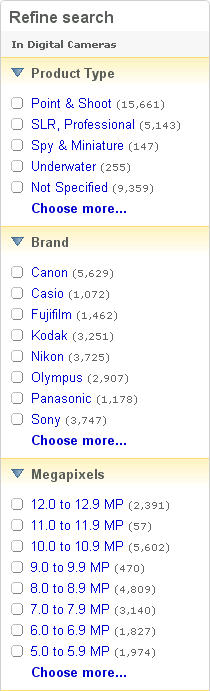
outputSelector: AspectHistogram |
| aspectHistogramContainer .aspect [ attribute name ] |
string | Conditionally |
A characteristic of an item in a domain. For example, "Optical Zoom", "Brand", and "Megapixels" could be aspects of the Digital Cameras domain. Aspects are well-known, standardized characteristics of a domain, and they vary from domain to domain (the aspects of "Men's Shoes" are different from those of "Digital Cameras"). A search request on the eBay site will often display aspects and their respective aspect values on the left-had side of a query response. Aspects are extracted from item listing properties (such as item titles and subtitles), and represent the characteristics of active items. Values returned in the Aspect container can be used as inputs to the aspectFilter fields in a query to distill the items returned by the query. eBay generates aspects dynamically from the items currently listed; aspects provide a view into what is currently available on eBay. Because of this, aspect values returned one day cannot be guaranteed to be valid the next day. The following graphic shows how eBay might return a set of aspects for the Digital Cameras domain. In this graphic, "Product Type", "Brand", and "Megapixels" are aspects, and "Point & Shoot", "Canon", and "12.0 to 12.9 MP" are aspect values. Histogram values (item counts) are shown for each aspect value.
|
|
aspectHistogramContainer .aspect.valueHistogram |
AspectValueHistogram | Conditionally,
repeatable: [0..*] |
Container that returns the name of the respective aspect value and the histogram (the number of available items) that share that item characteristic. This value is not returned if there are no matching aspects for the associated domain. outputSelector: AspectHistogram |
| aspectHistogramContainer .aspect.valueHistogram [ attribute valueName ] |
string | Conditionally |
Container that returns the name of the respective aspect value and the histogram (the number of available items) that share that item characteristic. This value is not returned if there are no matching aspects for the associated domain. |
|
aspectHistogramContainer .aspect.valueHistogram.count |
long | Conditionally |
Number of items that share the characteristic the respective aspect value.
outputSelector: AspectHistogram |
|
aspectHistogramContainer .domainDisplayName |
token | Conditionally |
A buy-side group of items, for example "Shoes." Domains are extracted from item listing properties, such as the title, descriptions, and so on.
outputSelector: AspectHistogram |
|
aspectHistogramContainer .domainName |
string | Conditionally |
A buy-side group of items that share aspects, but not necessarily an eBay category. For example "Women's Dresses" or "Digital Cameras" could be domains. You can use a domainName to label a set of aspects that you display. Domains are extracted from item listing properties (such as item titles and subtitles). outputSelector: AspectHistogram |
| categoryHistogramContainer | CategoryHistogramContainer | Conditionally |
Response container for category histograms. Only returned when one or more category histograms are returned. A category histogram is not returned if the search query returns no matching items. Note: When searching the eBay Motors site, category histograms may not be available for some parent categories. In these cases, aspect histograms should be used to refine search results. This behavior is consistent with eBay Motors site search behavior. outputSelector: CategoryHistogram |
|
categoryHistogramContainer .categoryHistogram |
CategoryHistogram (Category) | Conditionally,
repeatable: [0..*] |
Statistical (item count) information on the categories that contain items that match the search criteria or specified category or categories. A category histogram contains information for up to 10 child categories. Search result total entries may not necessarily match the sum of category histogram item counts. For search calls, the item count shows the distribution of matching items across each of the returned categories. A category histogram is not returned if there are no matching items or if the search is restricted to a single leaf category. For getHistograms, the category histogram contains the total item count for the specified category and item counts for the child categories containing the most item listings. A category histogram is not returned if the specified category is a leaf category. For categories associated with specific items, review the individual item containers returned in the search result. outputSelector: CategoryHistogram |
|
categoryHistogramContainer .categoryHistogram.categoryId |
string | Conditionally |
The unique ID of a category on the specified eBay site. Max length: 10. outputSelector: CategoryHistogram |
|
categoryHistogramContainer .categoryHistogram .categoryName |
string | Conditionally |
Display name of a category as it appears on the eBay Web site. Max length: 30. outputSelector: CategoryHistogram |
|
categoryHistogramContainer .categoryHistogram .childCategoryHistogram |
CategoryHistogram (Category) | Conditionally,
repeatable: [0..10] |
Container for histogram information pertaining to a child of the category specified in the request. Histograms return data on up to 10 children. Histograms are only a single level deep. That is, a given category histogram contains only immediate children.
outputSelector: CategoryHistogram |
|
categoryHistogramContainer .categoryHistogram .childCategoryHistogram .categoryId |
string | Conditionally |
The unique ID of a category on the specified eBay site. Max length: 10. outputSelector: CategoryHistogram |
|
categoryHistogramContainer .categoryHistogram .childCategoryHistogram .categoryName |
string | Conditionally |
Display name of a category as it appears on the eBay Web site. Max length: 30. outputSelector: CategoryHistogram |
|
categoryHistogramContainer .categoryHistogram .childCategoryHistogram .childCategoryHistogram |
CategoryHistogram (Category) | Conditionally,
repeatable: [0..10] |
Container for histogram information pertaining to a child of the category specified in the request. Histograms return data on up to 10 children. Histograms are only a single level deep. That is, a given category histogram contains only immediate children.
Recursion: Whatever the depth of data returned, the deepest level does not include childCategoryHistogram. outputSelector: CategoryHistogram |
|
categoryHistogramContainer .categoryHistogram .childCategoryHistogram.count |
long | Conditionally |
The total number of items in the associated category that match the search criteria.
outputSelector: CategoryHistogram |
|
categoryHistogramContainer .categoryHistogram.count |
long | Conditionally |
The total number of items in the associated category that match the search criteria.
outputSelector: CategoryHistogram |
| conditionHistogramContainer | ConditionHistogramContainer | Conditionally |
Response container for condition histograms. Not returned when Condition is specified in itemFilter. That is, only returned when you have not yet narrowed your search based on specific conditions. Supported for all eBay sites except US eBay Motors, India (IN), Malaysia (MY) and Philippines (PH). International items that appear in search results are included in a site's histogram counts. outputSelector: ConditionHistogram |
|
conditionHistogramContainer .conditionHistogram |
ConditionHistogram | Conditionally,
repeatable: [0..*] |
Statistical (item count) information on the condition of items that match the search criteria (or specified category). For example, the number of brand new items that match the query. Each conditionHistogram specifies one condition and the number of matching items found. The list of all conditionHistogram containers returned represents the union of all conditions that were found in the item results. For example, if items were found in different categories, and if those categories support different sets of item conditions, then all those conditions are returned in the list, regardless of category. If multiple items use the same condition ID, but some items use different display names for that condition, the histogram shows the site's default display name for that condition. This means that the condition name in a histogram may not always exactly match the condition names on the counted items. outputSelector: ConditionHistogram |
|
conditionHistogramContainer .conditionHistogram.condition |
Condition | Conditionally |
The name and unique ID of the item condition for which the count is being displayed.
outputSelector: ConditionHistogram |
|
conditionHistogramContainer .conditionHistogram.condition .conditionDisplayName |
string | Conditionally |
The human-readable label for the item condition. Display names are localized for the site on which they're listed (not necessarily the site on which they're viewed). In item results, this is only returned when the seller specified the item's condition using a structured format eBay recognizes. When conditionId is also present: Most categories use the same display name for the same condition ID. Some categories may override the display name based on buyer expectations for items in the category. For example, condition ID 1000 could be called "New" in one category and "New with tags" in another. If an item is listed in two categories, the primary category controls the display name. Behind the scenes, eBay's search engine uses the ID (not the display name) to determine whether items are new, used, or refurbished. So, if you need to normalize the conditions across categories (such as to group items by condition), it may be easier to use the ID and then show the varying display names for reference. In condition histograms: If you search against a specific category and some items match based on their secondary category, the histogram only shows the display name if the secondary category supports the condition. (Condition IDs and names are dependent on the primary category.) However, the histogram shows the condition ID and item counts. This should only occur in a very small percent of results. As a workaround, you can fill in the missing name based on the "Item Condition IDs and Names" (link below) or based on the condition from an applicable item in the results. For example, suppose a seller lists a concert T-shirt in a clothing category with the condition "New without tags" (1500), and also in a music accessories secondary category (where "New without tags" isn't a recognized condition). If you specify the music accessories category in your request, the condition ID (1500) is shown in the histogram, but not the display name. However, the display name is shown within the items. Max length: 50. outputSelector: none (not controlled by outputSelector) See Item Condition IDs and Names for a list of display names and the typical meaning of each condition. |
|
conditionHistogramContainer .conditionHistogram.condition .conditionId |
int | Conditionally |
The numeric ID (e.g., 1000) for the item condition. In item results, this is only returned when the seller listed the item with a condition ID. Some categories don't support or require condition IDs (e.g., most Antiques categories don't). If you Condition as a itemFilter, the response returns items with the correctly matching condition(s), even if conditionId is not returned. outputSelector: none (not controlled by outputSelector) See Item Condition IDs and Names for a list of display names and the typical meaning of each condition. |
|
conditionHistogramContainer .conditionHistogram.count |
int | Conditionally |
The number of items found that match the condition. Only counts items where the seller specified the condition by using item.conditionId.
outputSelector: ConditionHistogram |
| Standard Output Fields |
| ack | AckValue | Always |
Indicates whether or not errors or warnings were generated during the processing of the request.
Applicable values: Code so that your app gracefully handles any future changes to this list. outputSelector: none (not controlled by outputSelector) |
| errorMessage | ErrorMessage | Conditionally |
Description of an error or warning that occurred when eBay processed the request. Not returned if the ack value is Success.
outputSelector: none (not controlled by outputSelector) |
| errorMessage.error | ErrorData | Conditionally,
repeatable: [0..*] |
Details about a single error.
outputSelector: none (not controlled by outputSelector) |
| errorMessage.error.category | ErrorCategory | Conditionally |
There are three categories of errors: request errors, application errors, and system errors.
Applicable values: Code so that your app gracefully handles any future changes to this list. outputSelector: none (not controlled by outputSelector) |
| errorMessage.error.domain | string | Conditionally |
Name of the domain in which the error occurred.
outputSelector: none (not controlled by outputSelector) |
| errorMessage.error.errorId | long | Conditionally |
A unique code that identifies the particular error condition that occurred. Your application can use error codes as identifiers in your customized error-handling algorithms.
outputSelector: none (not controlled by outputSelector) |
| errorMessage.error.exceptionId | token | Conditionally |
Unique identifier for an exception associated with an error.
outputSelector: none (not controlled by outputSelector) |
| errorMessage.error.message | string | Conditionally |
A detailed description of the condition that caused in the error.
outputSelector: none (not controlled by outputSelector) |
| errorMessage.error.parameter | ErrorParameter (string) | Conditionally,
repeatable: [0..*] |
Various warning and error messages return one or more variables that contain contextual information about the error. This is often the field or value that triggered the error.
outputSelector: none (not controlled by outputSelector) |
| errorMessage.error.parameter [ attribute name ] |
string | Conditionally | Various warning and error messages return one or more variables that contain contextual information about the error. This is often the field or value that triggered the error. |
| errorMessage.error.severity | ErrorSeverity | Conditionally |
Indicates whether the reported problem is fatal (an error) or is less- severe (a warning). Review the error message details for information on the cause. If the request fails and the application is the source of the error (for example, a required element is missing), update the application before you retry the request. If the problem is due to incorrect user data, alert the end-user to the problem and provide the means for them to correct the data. Once the problem in the application or data is resolved, re-send the request to eBay. If the source of the problem is on eBay's side, you can retry the request a reasonable number of times (eBay recommends you try the request twice). If the error persists, contact Developer Technical Support. Once the problem has been resolved, you can resend the request in its original form. If a warning occurs, warning information is returned in addition to the business data. Normally, you do not need to resend the request (as the original request was successful). However, depending on the cause of the warning, you might need to contact the end user, or eBay, to effect a long term solution to the problem. Applicable values: Code so that your app gracefully handles any future changes to this list. outputSelector: none (not controlled by outputSelector) |
| errorMessage.error.subdomain | string | Conditionally |
Name of the subdomain in which the error occurred.
outputSelector: none (not controlled by outputSelector) |
| itemSearchURL | anyURI | Always |
A URL to view the search results on the eBay web site. The search results on the web site will use the same pagination as the API search results. Note: eBay URLs returned in fields, such as viewItemURL, are subject to syntax and other changes without notice. To avoid problems in your application when eBay alters the URL format, we advise you to avoid parsing eBay URLs programmatically. We strive to ensure that other fields in the response contain all the information that is encoded in the URL, and more. outputSelector: none (not controlled by outputSelector) |
| paginationOutput | PaginationOutput | Conditionally |
Indicates the pagination of the result set. Child elements indicate the page number that is returned, the maximum number of item listings to return per page, total number of pages that can be returned, and the total number of listings that match the search criteria.
outputSelector: none (not controlled by outputSelector) |
|
paginationOutput .entriesPerPage |
int | Conditionally |
The maximum number of items that can be returned in the response. This number is always equal to the value input for paginationInput.entriesPerPage. The end of the result set has been reached if the number specified for entriesPerPage is greater than the number of items found on the specified pageNumber. In this case, there will be fewer items returned than the number specified in entriesPerPage. This can be determined by comparing the entriesPerPage value with the value returned in the count attribute for the searchResult field. Min: 1. Max: 100. outputSelector: none (not controlled by outputSelector) |
| paginationOutput.pageNumber | int | Conditionally |
The subset of item data returned in the current response. Search results are divided into sets, or "pages," of item data. The number of pages is equal to the total number of items matching the search criteria divided by the value specified for entriesPerPage in the request. The response for a request contains one "page" of item data. This returned value indicates the page number of item data returned (a subset of the complete result set). If this field contains 1, the response contains the first page of item data (the default). If the value returned in totalEntries is less than the value for entriesPerPage, pageNumber returns 1 and the response contains the entire result set. The value of pageNumber is normally equal to the value input for paginationInput.pageNumber. However, if the number input for pageNumber is greater than the total possible pages of output, eBay returns the last page of item data in the result set, and the value for pageNumber is set to the respective (last) page number. Min: 0. Max: 100. outputSelector: none (not controlled by outputSelector) |
| paginationOutput.totalEntries | int | Conditionally |
The total number of items found that match the search criteria in your request. Depending on the input value for entriesPerPage, the response might include only a portion (a page) of the entire result set. A value of "0" is returned if eBay does not find any items that match the search criteria. Min: 0. outputSelector: none (not controlled by outputSelector) |
| paginationOutput.totalPages | int | Conditionally |
The total number of pages of data that could be returned by repeated search requests. Note that if you modify the value of inputPagination.entriesPerPage in a request, the value output for totalPages will change. A value of "0" is returned if eBay does not find any items that match the search criteria. Min: 0. outputSelector: none (not controlled by outputSelector) |
| searchResult | SearchResult | Always |
Container for the item listings that matched the search criteria. The data for each item is returned in individual containers, if any matches were found.
outputSelector: none (not controlled by outputSelector) |
| searchResult [ attribute count ] |
int | Always | Container for the item listings that matched the search criteria. The data for each item is returned in individual containers, if any matches were found. |
| searchResult.item | SearchItem | Always,
repeatable: [1..*] |
Container for the data of a single item that matches the search criteria.
outputSelector: none (not controlled by outputSelector) |
| searchResult.item.attribute | ItemAttribute | Conditionally,
repeatable: [0..*] |
item attribute
outputSelector: none (not controlled by outputSelector) |
| searchResult.item.autoPay | boolean | Always |
If true, the seller requires immediate payment for the item. If false (or not specified), immediate payment is not requested. Immediate payment does not apply to classified listings nor to auction listings that end with a winning bidder. Note: The value of the autoPay flag indicates the seller's stated preference only. It does not indicate whether the listing is still a candidate for purchase via immediate payment. For example, if a listing receives bids and no longer qualifies for immediate payment, the value of the autoPay flag does not change. outputSelector: none (not controlled by outputSelector) |
| searchResult.item.charityId | string | Conditionally |
A unique identification number assigned by eBay to a registered non-profit charity organization.
outputSelector: none (not controlled by outputSelector) See GetCharities in the Trading API for information to retrieve details on a specific charity. |
|
searchResult.item .compatibility |
string | Conditionally |
Starting in March 2010, parts compatibility will be supported in limited Parts & Accessories categories for eBay Motors in the Production environment. For these categories, a compatible application will always be a vehicle, which is specified by a combination of make, model, and year. Optionally, trim and engine data may also be specifed for a vehicle. This field returns terms from the keywords in the request that match values in one of the item's compatible applications (vehicles). If the keywords match more than one compatible application for an item, the field returns "Two or more of your vehicles" to indicate multiple matches. For example, keyword queries that contain vehicle details, such as make and model (e.g., Honda Accord), in addition to keywords for the part or accessory, will search through structured parts compatibility information for matching listings. If an item has a 2007 Honda Accord (any trim or engine) specified as a compatible application, and the item matches the part or accessory terms in the query, this field will return the matching terms from the query (i.e., Honda Accord). Parts compatibility is an eBay feature that uses structured data to associate compatible assemblies with parts and accessories listed on eBay. For example, parts compatibility enables sellers to specify accurately and comprehensively the vehicles on which a side mirror or a rim fit. Parts compatibility improves search relevancy and frees up item titles and descriptions for more useful descriptions of the part. outputSelector: none (not controlled by outputSelector) |
| searchResult.item.condition | Condition | Conditionally |
This container shows the name and unique ID of the item's condition. This container will generally get returned unless the item is in an eBay category that does not require an item condition. Supported item conditions vary by category.
outputSelector: none (not controlled by outputSelector) |
|
searchResult.item.condition .conditionDisplayName |
string | Conditionally |
The human-readable label for the item condition. Display names are localized for the site on which they're listed (not necessarily the site on which they're viewed). In item results, this is only returned when the seller specified the item's condition using a structured format eBay recognizes. When conditionId is also present: Most categories use the same display name for the same condition ID. Some categories may override the display name based on buyer expectations for items in the category. For example, condition ID 1000 could be called "New" in one category and "New with tags" in another. If an item is listed in two categories, the primary category controls the display name. Behind the scenes, eBay's search engine uses the ID (not the display name) to determine whether items are new, used, or refurbished. So, if you need to normalize the conditions across categories (such as to group items by condition), it may be easier to use the ID and then show the varying display names for reference. In condition histograms: If you search against a specific category and some items match based on their secondary category, the histogram only shows the display name if the secondary category supports the condition. (Condition IDs and names are dependent on the primary category.) However, the histogram shows the condition ID and item counts. This should only occur in a very small percent of results. As a workaround, you can fill in the missing name based on the "Item Condition IDs and Names" (link below) or based on the condition from an applicable item in the results. For example, suppose a seller lists a concert T-shirt in a clothing category with the condition "New without tags" (1500), and also in a music accessories secondary category (where "New without tags" isn't a recognized condition). If you specify the music accessories category in your request, the condition ID (1500) is shown in the histogram, but not the display name. However, the display name is shown within the items. Max length: 50. outputSelector: none (not controlled by outputSelector) See Item Condition IDs and Names for a list of display names and the typical meaning of each condition. |
|
searchResult.item.condition .conditionId |
int | Conditionally |
The numeric ID (e.g., 1000) for the item condition. In item results, this is only returned when the seller listed the item with a condition ID. Some categories don't support or require condition IDs (e.g., most Antiques categories don't). If you Condition as a itemFilter, the response returns items with the correctly matching condition(s), even if conditionId is not returned. outputSelector: none (not controlled by outputSelector) See Item Condition IDs and Names for a list of display names and the typical meaning of each condition. |
| searchResult.item.country | token | Conditionally |
Two-letter ISO 3166 country code to indicate the country where the item is located (e.g., "US" for the United States or "GB" for the United Kingdom).
outputSelector: none (not controlled by outputSelector) See English country names and code elements for country names and corresponding ISO 3166 codes. |
|
searchResult.item .discountPriceInfo |
DiscountPriceInfo | Conditionally |
The format type of the listing, such as online auction, fixed price, or advertisement.
outputSelector: none (not controlled by outputSelector) |
| searchResult.item.distance | Distance (double) | Conditionally |
The distance that the item is from the buyer, calculated using buyerPostalCode. The unit for distance varies by site, and is either miles or kilometers. If the country whose site you are searching uses kilometers to measure distance (for example, India/EBAY-IN), the unit is kilometers. If the site is either the US or UK, the distance unit is miles. This value is only returned for distance-based searches. You must specify a buyerPostalCode and either sort by Distance, or use a combination of the MaxDistance LocalSearch itemFilters. outputSelector: none (not controlled by outputSelector) |
| searchResult.item.distance [ attribute unit ] |
string | Conditionally |
The distance that the item is from the buyer, calculated using buyerPostalCode. The unit for distance varies by site, and is either miles or kilometers. If the country whose site you are searching uses kilometers to measure distance (for example, India/EBAY-IN), the unit is kilometers. If the site is either the US or UK, the distance unit is miles. This value is only returned for distance-based searches. You must specify a buyerPostalCode and either sort by Distance, or use a combination of the MaxDistance LocalSearch itemFilters. |
|
searchResult.item .eBayPlusEnabled |
boolean | Conditionally |
Indicates whether the item is ebayPlus item. This field is returned for the following sites only: DE (EBAY-DE), AU (EBAY-AU)
outputSelector: none (not controlled by outputSelector) |
| searchResult.item.eekStatus | string | Conditionally,
repeatable: [0..*] |
eek status of the item
outputSelector: none (not controlled by outputSelector) |
|
searchResult.item .galleryInfoContainer |
GalleryInfoContainer | Conditionally |
Contains three URLs for item thumbnail images in standard sizes. Not returned if the item has no images. That is, if the item was not listed using a product identifier and the seller has not uploaded images, the container will not be returned, even when the outputSelector is set to GalleryInfo.
outputSelector: GalleryInfo |
|
searchResult.item .galleryInfoContainer .galleryURL |
GalleryURL (anyURI) | Always,
repeatable: [1..3] |
URL for a single item image thumbnail of a specific size.
outputSelector: none (not controlled by outputSelector) |
| searchResult.item .galleryInfoContainer .galleryURL [ attribute gallerySize ] |
GallerySizeEnum | Conditionally |
URL for a single item image thumbnail of a specific size. For a list of possible enumeration values, see GallerySizeEnum. |
|
searchResult.item .galleryPlusPictureURL |
anyURI | Conditionally,
repeatable: [0..*] |
URL for the Gallery Plus image. The size of Gallery Plus images (up to 500 pixels on the longest side) is bigger than the size of standard gallery images. In site search results, you can view the Gallery Plus image by hovering over or clicking the Enlarge link or magifying glass icon. This field is only returned when the seller has opted for the Gallery Plus option for the given item.
outputSelector: none (not controlled by outputSelector) |
| searchResult.item.galleryURL | anyURI | Conditionally |
URL for the Gallery thumbnail image. Returned only if the seller uploaded images for the item or the item was listed using a product identifier.
outputSelector: none (not controlled by outputSelector) |
| searchResult.item.globalId | token | Always |
The identifier for the site on which the item is listed. Returns a Global ID, which is a unique identifier that specifies the combination of the site, language, and territory. In other eBay APIs (such as the Shopping API), this value is know as the site ID.
outputSelector: none (not controlled by outputSelector) See Global ID Values for a list of possible enumeration values and how they map to eBay sites. |
| searchResult.item.itemId | string | Always |
The ID that uniquely identifies the item listing. eBay generates this ID when an item is listed. ID values are unique across all eBay sites. Max length: 19 (normally, item IDs are 9 to 12 digits in length) . outputSelector: none (not controlled by outputSelector) |
| searchResult.item.listingInfo | ListingInfo | Conditionally |
The format type of the listing, such as online auction, fixed price, or advertisement.
outputSelector: none (not controlled by outputSelector) |
|
searchResult.item.listingInfo .bestOfferEnabled |
boolean | Conditionally |
Shows whether or not the seller will accept a best offer for the associated item. Best Offer allows a buyer to make a lower-priced binding offer on a fixed price item. Buyers cannot see how many offers have been made (only the seller can see this information). To make a best offer on a listing, use the eBay Web site.
outputSelector: none (not controlled by outputSelector) |
|
searchResult.item.listingInfo .buyItNowAvailable |
boolean | Conditionally |
Applies only to auction listings that were listed with a Buy It Now price. Buy It Now lets a user purchase the item at a fixed price, effectively ending the auction. On most sites, the Buy It Now option is removed (and this value returns false) once a valid bid is made on the associated item (a valid bid could be a bid above the reserve price). buyItNowAvailable will return "false" if the listing type is anything but "AuctionWithBIN". Please ignore buyItNowAvailable for fixed-price listings. outputSelector: none (not controlled by outputSelector) |
|
searchResult.item.listingInfo .buyItNowPrice |
Amount (double) | Conditionally |
The Buy It Now Price of the item (if any), in the currency of the site on which the item was listed. You can use this field to determine if the item was originally listed with Buy It Now, even if the Buy It Now option is no longer available for the item. For Basic Fixed-Price (FixedPrice), Store Inventory (StoreInventory), Ad Format (AdFormat), and Classified Ad (Classified) listings, currentPrice is the current fixed price. Only returned if an item was listed with Buy It Now. outputSelector: none (not controlled by outputSelector) |
| searchResult.item.listingInfo .buyItNowPrice [ attribute currencyId ] |
string | Always |
The Buy It Now Price of the item (if any), in the currency of the site on which the item was listed. You can use this field to determine if the item was originally listed with Buy It Now, even if the Buy It Now option is no longer available for the item. For Basic Fixed-Price (FixedPrice), Store Inventory (StoreInventory), Ad Format (AdFormat), and Classified Ad (Classified) listings, currentPrice is the current fixed price. Only returned if an item was listed with Buy It Now. |
|
searchResult.item.listingInfo .convertedBuyItNowPrice |
Amount (double) | Conditionally |
The listing's Buy It Now Price (if any), converted into the currency of the site to which you sent your search request. For active items, refresh this value every 24 hours to pick up changes in conversion rates (if this value has been converted). Price fields are returned as doubles, not necessarily in the traditional monetary format of the site's country. For example, a US Dollar value might be returned as 3.880001 instead of 3.88. Only returned if an item was listed with Buy It Now. outputSelector: none (not controlled by outputSelector) |
| searchResult.item.listingInfo .convertedBuyItNowPrice [ attribute currencyId ] |
string | Always |
The listing's Buy It Now Price (if any), converted into the currency of the site to which you sent your search request. For active items, refresh this value every 24 hours to pick up changes in conversion rates (if this value has been converted). Price fields are returned as doubles, not necessarily in the traditional monetary format of the site's country. For example, a US Dollar value might be returned as 3.880001 instead of 3.88. Only returned if an item was listed with Buy It Now. |
|
searchResult.item.listingInfo .endTime |
dateTime | Conditionally |
Time stamp specifying when the listing is scheduled to end, or the actual end time if the item listing has ended. This value is returned in GMT, the ISO 8601 date and time format (YYYY-MM- DDTHH:MM:SS.SSSZ). See the "dateTime" type for information about the time format, and for details on converting to and from the GMT time zone. Note: For items that are "Good Till Canceled," this value is 5 minutes later than the actual end time of the item. This difference in time is intended to facilitate the renewal of these items' end times (which occurs every 30 days). outputSelector: none (not controlled by outputSelector) |
|
searchResult.item.listingInfo .gift |
boolean | Conditionally |
If true, a generic gift icon displays next the listing's title in search and browse pages.
outputSelector: none (not controlled by outputSelector) |
|
searchResult.item.listingInfo .listingType |
token | Conditionally |
The format of the listing, such as online auction, fixed price, or advertisement.
outputSelector: none (not controlled by outputSelector) |
|
searchResult.item.listingInfo .startTime |
dateTime | Conditionally |
Time stamp that eBay recorded as the moment the listing was made available. This value is returned in GMT, the ISO 8601 date and time format (YYYY-MM- DDTHH:MM:SS.SSSZ). See the "dateTime" type for information about the time format, and for details on converting to and from the GMT time zone. Note that it is possible for startTime to be different from the value returned by GetSingleItem.
outputSelector: none (not controlled by outputSelector) |
| searchResult.item.location | string | Conditionally |
Physical location of the item, as specified by the seller. This gives a general indication from where the item will be shipped (or delivered).
outputSelector: none (not controlled by outputSelector) |
|
searchResult.item .paymentMethod |
token | Conditionally,
repeatable: [0..*] |
Identifies the payment method (or methods) available to the buyer to purchase the item.
outputSelector: none (not controlled by outputSelector) See BuyerPaymentMethodCodeType in the Shopping API for a complete list of possible paymentMethod response values. |
|
searchResult.item .pictureURLLarge |
anyURI | Conditionally |
URL for item's picture url with size 400x400
outputSelector: none (not controlled by outputSelector) |
|
searchResult.item .pictureURLSuperSize |
anyURI | Conditionally |
URL for item's picture url with size 800x800
outputSelector: none (not controlled by outputSelector) |
| searchResult.item.postalCode | string | Conditionally |
The postal code where the listed item is located. This field is returned only if a postal code has been specified by the seller. Sellers set a postal code (or zip code in US) for items when they are listed. The postal code is used for calculating proximity searches. It is anonymized when returned via the API. eBay proximity and local search behavior can use the combination of buyerPostalCode and postalCode values. outputSelector: none (not controlled by outputSelector) |
|
searchResult.item .primaryCategory |
Category | Always |
Details about the first (or only) category in which the item is listed. Note that items can be listed in more than a single category.
outputSelector: none (not controlled by outputSelector) |
|
searchResult.item .primaryCategory.categoryId |
string | Always |
The unique ID of a category on the specified eBay site. Max length: 10. outputSelector: none (not controlled by outputSelector) |
|
searchResult.item .primaryCategory.categoryName |
string | Always |
Display name of a category as it appears on the eBay Web site. Max length: 30. outputSelector: none (not controlled by outputSelector) |
| searchResult.item.productId | ProductId (string) | Conditionally |
Unique identifier for the eBay catalog product with which the item was listed. An eBay catalog product consists of pre-filled Item Specifics, additional descriptive information, plus a stock photo (if available). These product details are used to pre-fill item information, which is used to describe the item and can also help surface the item in searches. eBay supports the following types of product ID types: ISBN, UPC, EAN, and ReferenceID (ePID, also known as an eBay Product Reference ID). ReferenceID values are returned when available. A UPC, ISBN, or EAN product identifier will be returned only when a ReferenceID is not available. This productId value can be used as input with findItemsByProduct to retrieve items that were listed with the specified eBay catalog product. This field is only returned when a product was used to list the item. outputSelector: none (not controlled by outputSelector) |
|
searchResult.item .returnsAccepted |
boolean | Conditionally |
This is set to true if the seller accepts return of the item.
outputSelector: none (not controlled by outputSelector) |
|
searchResult.item .secondaryCategory |
Category | Conditionally |
Details about the second category in which the item is listed. This element is not returned if the seller did not specify a secondary category.
outputSelector: none (not controlled by outputSelector) |
|
searchResult.item .secondaryCategory.categoryId |
string | Conditionally |
The unique ID of a category on the specified eBay site. Max length: 10. outputSelector: none (not controlled by outputSelector) |
|
searchResult.item .secondaryCategory .categoryName |
string | Conditionally |
Display name of a category as it appears on the eBay Web site. Max length: 30. outputSelector: none (not controlled by outputSelector) |
| searchResult.item.sellerInfo | SellerInfo | Conditionally |
Information about the item's seller. Only returned if SellerInfo is specified in the outputSelector field in the request.
outputSelector: SellerInfo |
|
searchResult.item.sellerInfo .feedbackRatingStar |
token | Conditionally |
Visual indicator of user's feedback score.
outputSelector: SellerInfo |
|
searchResult.item.sellerInfo .feedbackScore |
long | Conditionally |
The aggregate feedback score of the seller. A seller's feedback score is their net positive feedback minus their net negative feedback. Feedback scores are a quantitative expression of the desirability of dealing with a seller in a transaction.
outputSelector: SellerInfo |
|
searchResult.item.sellerInfo .positiveFeedbackPercent |
double | Conditionally |
The percentage value of a user's positive feedback (their positive feedbackScore divided by their total positive plus negative feedback).
outputSelector: SellerInfo |
|
searchResult.item.sellerInfo .sellerUserName |
string | Conditionally |
The seller's eBay user name; a unique value.
outputSelector: SellerInfo |
|
searchResult.item.sellerInfo .topRatedSeller |
boolean | Conditionally |
Indicates whether the seller of the item is top-rated. A top-rated seller:
This field is returned for the following sites only: US (EBAY-US), Motors (EBAY-MOTOR), DE (EBAY-DE), AT (EBAY-AT), and CH (EBAY-CH). outputSelector: SellerInfo |
|
searchResult.item .sellingStatus |
SellingStatus | Conditionally |
Specifies the item's selling status with regards to eBay's processing workflow.
outputSelector: none (not controlled by outputSelector) |
|
searchResult.item .sellingStatus.bidCount |
int | Conditionally |
The number of bids that have been placed on the item. Min: 0. outputSelector: none (not controlled by outputSelector) |
|
searchResult.item .sellingStatus .convertedCurrentPrice |
Amount (double) | Conditionally |
The listing's current price converted to the currency of the site specified in the find request (globalId).
outputSelector: none (not controlled by outputSelector) |
| searchResult.item .sellingStatus .convertedCurrentPrice [ attribute currencyId ] |
string | Always | The listing's current price converted to the currency of the site specified in the find request (globalId). |
|
searchResult.item .sellingStatus.currentPrice |
Amount (double) | Conditionally |
The current price of the item given in the currency of the site on which the item is listed. That is, currentPrice is returned in the original listing currency. For competitive-bid item listings, currentPrice is the current minimum bid price if the listing has no bids, or the current high bid if the listing has bids. A Buy It Now price has no effect on currentPrice. For Basic Fixed-Price (FixedPrice), Store Inventory (StoreInventory), Ad Format (AdFormat), and Classified Ad (Classified) listings, currentPrice is the current fixed price. outputSelector: none (not controlled by outputSelector) |
| searchResult.item .sellingStatus.currentPrice [ attribute currencyId ] |
string | Always |
The current price of the item given in the currency of the site on which the item is listed. That is, currentPrice is returned in the original listing currency. For competitive-bid item listings, currentPrice is the current minimum bid price if the listing has no bids, or the current high bid if the listing has bids. A Buy It Now price has no effect on currentPrice. For Basic Fixed-Price (FixedPrice), Store Inventory (StoreInventory), Ad Format (AdFormat), and Classified Ad (Classified) listings, currentPrice is the current fixed price. |
|
searchResult.item .sellingStatus.sellingState |
token | Conditionally |
Specifies the listing's status in eBay's processing workflow. If an item's EndTime is in the past, but there are no details about the buyer or high bidder (and the user is not anonymous), you can use sellingState information to determine whether eBay has finished processing the listing.
outputSelector: none (not controlled by outputSelector) |
|
searchResult.item .sellingStatus.timeLeft |
duration | Conditionally |
Time left before the listing ends. The duration is represented in the ISO 8601 duration format (PnYnMnDTnHnMnS). For listings that have ended, the time left is PT0S (zero seconds). See the "duration" type for information about this time format.
outputSelector: none (not controlled by outputSelector) |
| searchResult.item.shippingInfo | ShippingInfo | Conditionally |
Container for data about a listing's shipping details.
outputSelector: none (not controlled by outputSelector) |
|
searchResult.item.shippingInfo .expeditedShipping |
boolean | Conditionally |
This is returned set to true if expedited shipping is available for the item.
outputSelector: none (not controlled by outputSelector) |
|
searchResult.item.shippingInfo .handlingTime |
int | Conditionally |
The number of days it will take the seller to ship this item.
outputSelector: none (not controlled by outputSelector) |
|
searchResult.item.shippingInfo .oneDayShippingAvailable |
boolean | Conditionally |
This is returned set to true if one-day shipping is available for the item.
outputSelector: none (not controlled by outputSelector) |
|
searchResult.item.shippingInfo .shippingServiceCost |
Amount (double) | Conditionally |
The basic shipping cost of the item. This reflects the domestic shipping cost or the international shipping costs, depending on which applies (that is, whether the bidder/buyer is in the same country as the listing site of the item).
outputSelector: none (not controlled by outputSelector) |
| searchResult.item.shippingInfo .shippingServiceCost [ attribute currencyId ] |
string | Always | The basic shipping cost of the item. This reflects the domestic shipping cost or the international shipping costs, depending on which applies (that is, whether the bidder/buyer is in the same country as the listing site of the item). |
|
searchResult.item.shippingInfo .shippingType |
token | Conditionally |
The shipping method that was used for determining the cost of shipping. For example: flat rate, calculated, or free. The seller specifies the available shipping services when they list the item.
outputSelector: none (not controlled by outputSelector) |
|
searchResult.item.shippingInfo .shipToLocations |
string | Conditionally,
repeatable: [0..*] |
An international location or region to which the seller is willing to ship the item. Only returned when the seller has specifically identified locations where she is willing to ship the given item. specified.
outputSelector: none (not controlled by outputSelector) See shipToLocations for a complete list of shipping locations. |
| searchResult.item.storeInfo | Storefront | Conditionally |
Information about the eBay store in which the item is listed. Only returned if the item is listed in a store and StoreInfo is specified in the outputSelector field in the request.
outputSelector: StoreInfo |
|
searchResult.item.storeInfo .storeName |
string | Conditionally |
The name of the seller's eBay Store. Max length: 200. outputSelector: StoreInfo |
|
searchResult.item.storeInfo .storeURL |
anyURI | Conditionally |
The URL of the seller's eBay Store page.
outputSelector: StoreInfo |
| searchResult.item.subtitle | string | Conditionally |
Subtitle of the item. Only returned if the seller included a subtitle for the listing.
outputSelector: none (not controlled by outputSelector) |
| searchResult.item.title | string | Conditionally |
Name of the item as it appears in the listing title, or in search and browse results.
outputSelector: none (not controlled by outputSelector) |
|
searchResult.item .topRatedListing |
boolean | Conditionally |
Indicates whether the item is Top Rated Plus item. A top rated plus item:
|
| searchResult.item.unitPrice | UnitPriceInfo | Conditionally |
Unit price information of the item
outputSelector: none (not controlled by outputSelector) |
| searchResult.item.viewItemURL | anyURI | Conditionally |
The URL to view this specific listing on eBay. The returned URL is optimized to support natural search. That is, the URL is designed to make items on eBay easier to find via popular internet search engines. The URL includes the item title along with other optimizations. If you enabled affiliate tracking in the call, viewItemURL contains a string that includes affiliate tracking information. Note: eBay URLs returned in fields, such as viewItemURL, are subject to syntax and other changes without notice. To avoid problems in your application when eBay alters the URL format, we advise you to avoid parsing eBay URLs programmatically. We strive to ensure that other fields in the response contain all the information that is encoded in the URL, and more. outputSelector: none (not controlled by outputSelector) See eBay Partner Network for more information. |
| timestamp | dateTime | Always |
This value represents the date and time when eBay processed the request. This value is returned in GMT, the ISO 8601 date and time format (YYYY- MM- DDTHH:MM:SS.SSSZ). See the "dateTime" type for information about the time format, and for details on converting to and from the GMT time zone.
outputSelector: none (not controlled by outputSelector) |
| version | string | Always |
The release version that eBay used to process the request. Developer Technical Support may ask you for the version value if you work with them to troubleshoot issues. Note: The version in use is normally the latest release version, as specified in the release notes. Note that eBay releases the API to international sites about a week after the API version is released to the US site. outputSelector: none (not controlled by outputSelector) |
| Input Output Samples Change History |
Detail Controls
DetailLevel
This call does not support varying Detail Levels. You do not need to pass DetailLevel in the request.
outputSelector
The outputSelector input field gives you control over which call-specific output fields may be returned from your queries. outputSelector accepts a set of preset values, each of which permits the return of a different set of fields. (All standard output fields are returned regardless of outputSelector.)
The table below details the fields that each outputSelector value controls. In addition, the table includes a none column that shows the fields that are not controlled by outputSelector settings. Note that some fields are returned only when certain conditions are met; see the associated field documentation for a clarification of these conditions.
| Y | The field is always returned. |
| (Y) | The field is conditionally returned. See the field documentation for clarification of conditions. |
| Input Output Detail Controls Change History |
Samples
Note: Some item IDs, user IDs, or other data in these samples might no longer be active on eBay. If necessary, you can substitute current eBay data in your requests.
Available samples:
- Basic Call ↓ - Retrieves a set of items based on the keywords you provide.
- MaxPrice Item Filter ↓ - Retrieves a set of items based on the keywords you provide and a price filter.
- Filter by Price and Free Shipping ↓ - Retrieves a set of items with free shipping based on the keywords you provide and a price filter.
- Proximity Search ↓ - Retrieves a set of items based on the keywords you provide. Only items located within the specified distance from a supplied postal code are returned.
- Reviewing Seller Information, Items Sorted by Distance ↓ - Sort the responses by the distance from the buyer, as determined by the buyer's postal code.
- Specifying Affiliate Information ↓ - This sample specifies affiliate information and sorts the response according to the end time of the auction.
Retrieves a set of items based on the keywords you provide.
Description
The user is looking for a specific Harry Potter title.
Input
The keywords field specifies keywords for which items are returned. Multiple keywords are separated by spaces, which are coded as %20 in URL requests.
Note: URL samples have been wrapped for readability. To run the samples, undo the line wrapping and insert your own SECURITY-APPNAME.
URL format. See also the non-wrapped version of this URL. For results in a format other than XML,
specify a different value for responseencoding.

https://svcs.ebay.com/services/search/FindingService/v1?
   OPERATION-NAME=findItemsByKeywords&
   SERVICE-VERSION=1.0.0&
   SECURITY-APPNAME=YourAppID&
   RESPONSE-DATA-FORMAT=XML&
   REST-PAYLOAD&
   keywords=harry%20potter%20phoenix&
   paginationInput.entriesPerPage=2
Here is the same input in XML format. Note that this does not include standard values.
XML format. Also available is the JSON equivalent.

<?xml version="1.0" encoding="UTF-8"?>
<findItemsByKeywordsRequest xmlns="http://www.ebay.com/marketplace/search/v1/services">
  <keywords>harry potter phoenix</keywords>
  <paginationInput>
    <entriesPerPage>2</entriesPerPage>
  </paginationInput>
</findItemsByKeywordsRequest>
Output
XML format. Also available is the JSON equivalent.

<?xml version="1.0" encoding="UTF-8"?>
<findItemsByKeywordsResponse xmlns:ms="https://www.ebay.com/marketplace/services"
xmlns="http://www.ebay.com/marketplace/search/v1/services">
   <ack>Success</ack>
   <version>1.12.0</version>
   <timestamp>2015-09-04T00:46:55.581Z</timestamp>
   <searchResult count="2">
      <item>
         <itemId>1**********4</itemId>
         <title>NINTENDO WII GAME HARRY POTTER ORDER OF THE PHOENIX NEW</title>
         <globalId>EBAY-US</globalId>
         <subtitle>??FAST SECURE SHIPPING SEE OUR STORE 100,000+ GAMES??</subtitle>
         <primaryCategory>
            <categoryId>139973</categoryId>
            <categoryName>Games</categoryName>
         </primaryCategory>
         <galleryURL>
         https://thumbs1.ebaystatic.com/pict/1**************0_1.jpg</galleryURL>
         <viewItemURL>https://cgi.ebay.com/NINTENDO-WII-GAME-HARRY-POTTER-ORDER-OF-THE-
         PHOENIX-NEW_W0QQitemZ1**********4QQcmdZViewItemQQptZVideo_Games_Games?hash=
         item20ad1c5e0c</viewItemURL>
         <productId type="ReferenceID">56277256</productId>
         <paymentMethod>PayPal</paymentMethod>
         <paymentMethod>VisaMC</paymentMethod>
         <paymentMethod>Discover</paymentMethod>
         <autoPay>false</autoPay>
         <postalCode>42***</postalCode>
         <location>Pembroke,KY,USA</location>
         <country>US</country>
         <shippingInfo>
            <shippingServiceCost currencyId="USD">0.0</shippingServiceCost>
            <shippingType>Free</shippingType>
            <shipToLocations>Worldwide</shipToLocations>
         </shippingInfo>
         <sellingStatus>
            <currentPrice currencyId="USD">30.99</currentPrice>
            <convertedCurrentPrice currencyId="USD">30.99</convertedCurrentPrice>
            <bidCount>0</bidCount>
            <sellingState>Active</sellingState>
            <timeLeft>P0DT5H35M49S</timeLeft>
         </sellingStatus>
         <listingInfo>
            <bestOfferEnabled>false</bestOfferEnabled>
            <buyItNowAvailable>true</buyItNowAvailable>
            <buyItNowPrice currencyId="USD">33.94</buyItNowPrice>
            <convertedBuyItNowPrice currencyId="USD">33.94</convertedBuyItNowPrice>
            <startTime>2015-09-01T06:22:44.000Z</startTime>
            <endTime>2015-09-04T06:22:44.000Z</endTime>
            <listingType>AuctionWithBIN</listingType>
            <gift>false</gift>
         </listingInfo>
      </item>
      <item>
         <itemId>2**********1</itemId>
         <title>Harry Potter and the Order of the Phoenix HD-DVD</title>
         <globalId>EBAY-US</globalId>
         <primaryCategory>
            <categoryId>617</categoryId>
            <categoryName>DVD, HD DVD & Blu-ray</categoryName>
         </primaryCategory>
         <galleryURL>
         https://thumbs1.ebaystatic.com/pict/2**************0_1.jpg</galleryURL>
         <viewItemURL>https://cgi.ebay.com/Harry-Potter-and-the-Order-of-the-Phoenix-HD-
         DVD_W0QQitemZ2**********1QQcmdZViewItemQQptZUS_DVD_HD_DVD_Blu_ray?hash=
         item35a33cd179</viewItemURL>
         <productId type="ReferenceID">62929195</productId>
         <paymentMethod>PayPal</paymentMethod>
         <autoPay>false</autoPay>
         <postalCode>21***</postalCode>
         <location>Frederick,MD,USA</location>
         <country>US</country>
         <shippingInfo>
            <shippingType>Calculated</shippingType>
            <shipToLocations>US</shipToLocations>
         </shippingInfo>
         <sellingStatus>
            <currentPrice currencyId="USD">2.5</currentPrice>
            <convertedCurrentPrice currencyId="USD">2.5</convertedCurrentPrice>
            <bidCount>8</bidCount>
            <sellingState>Active</sellingState>
            <timeLeft>P0DT0H1M28S</timeLeft>
         </sellingStatus>
         <listingInfo>
            <bestOfferEnabled>false</bestOfferEnabled>
            <buyItNowAvailable>false</buyItNowAvailable>
            <startTime>2015-08-28T00:48:23.000Z</startTime>
            <endTime>2015-09-04T00:48:23.000Z</endTime>
            <listingType>Auction</listingType>
            <gift>false</gift>
         </listingInfo>
      </item>
   </searchResult>
   <paginationOutput>
      <totalPages>433</totalPages>
      <totalEntries>866</totalEntries>
      <pageNumber>1</pageNumber>
      <entriesPerPage>2</entriesPerPage>
   </paginationOutput>
</findItemsByKeywordsResponse>
Retrieves a set of items based on the keywords you provide and a price filter.
Description
The user is looking for a specific Harry Potter title and has a maximum price ceiling.
Input
To specify a MaxPrice item filter, you set itemFilter.name to MaxPrice and itemFilter.value to the maximum price, $10.00. The user uses itemFilter.paramName and
and itemFilter.paramValue to specify the currency for the filter, US dollars, in this case.
Note: URL samples have been wrapped for readability. To run the samples, undo the line wrapping and insert your own SECURITY-APPNAME.
URL format. See also the non-wrapped version of this URL. For results in a format other than XML,
specify a different value for responseencoding.

https://svcs.ebay.com/services/search/FindingService/v1?
   OPERATION-NAME=findItemsByKeywords&
   SERVICE-VERSION=1.0.0&
   SECURITY-APPNAME=YourAppID&
   RESPONSE-DATA-FORMAT=XML&
   REST-PAYLOAD&
   keywords=harry%20potter%20phoenix&
   itemFilter.name=MaxPrice&
   itemFilter.value=10.00&
   itemFilter.paramName=Currency&
   itemFilter.paramValue=USD&
   paginationInput.entriesPerPage=2
Here is the same input in XML format. Note that this does not include standard values.
XML format. Also available is the JSON equivalent.

<?xml version="1.0" encoding="UTF-8"?>
<findItemsByKeywordsRequest xmlns="http://www.ebay.com/marketplace/search/v1/services">
  <keywords>harry potter phoenix</keywords>
  <itemFilter>
    <name>MaxPrice</name>
    <value>10.00</value>
    <paramName>Currency</paramName>
    <paramValue>USD</paramValue>
  </itemFilter>
  <paginationInput>
    <entriesPerPage>2</entriesPerPage>
  </paginationInput>
</findItemsByKeywordsRequest>
Output
The response contains matching items with a current price of $10 or less.
XML format. Also available is the JSON equivalent.

<?xml version="1.0" encoding="UTF-8"?>
<findItemsByKeywordsResponse xmlns:ms="https://www.ebay.com/marketplace/services"
xmlns="http://www.ebay.com/marketplace/search/v1/services">
   <ack>Success</ack>
   <version>1.12.0</version>
   <timestamp>2015-09-04T00:47:12.456Z</timestamp>
   <searchResult count="2">
      <item>
         <itemId>2**********1</itemId>
         <title>Harry Potter and the Order of the Phoenix HD-DVD</title>
         <globalId>EBAY-US</globalId>
         <primaryCategory>
            <categoryId>617</categoryId>
            <categoryName>DVD, HD DVD & Blu-ray</categoryName>
         </primaryCategory>
         <galleryURL>
         https://thumbs1.ebaystatic.com/pict/2**************0_1.jpg</galleryURL>
         <viewItemURL>https://cgi.ebay.com/Harry-Potter-and-the-Order-of-the-Phoenix-HD-
         DVD_W0QQitemZ2**********1QQcmdZViewItemQQptZUS_DVD_HD_DVD_Blu_ray?hash=
         item35a33cd179</viewItemURL>
         <productId type="ReferenceID">62929195</productId>
         <paymentMethod>PayPal</paymentMethod>
         <autoPay>false</autoPay>
         <postalCode>21***</postalCode>
         <location>Frederick,MD,USA</location>
         <country>US</country>
         <shippingInfo>
            <shippingType>Calculated</shippingType>
            <shipToLocations>US</shipToLocations>
         </shippingInfo>
         <sellingStatus>
            <currentPrice currencyId="USD">2.5</currentPrice>
            <convertedCurrentPrice currencyId="USD">2.5</convertedCurrentPrice>
            <bidCount>8</bidCount>
            <sellingState>Active</sellingState>
            <timeLeft>P0DT0H1M11S</timeLeft>
         </sellingStatus>
         <listingInfo>
            <bestOfferEnabled>false</bestOfferEnabled>
            <buyItNowAvailable>false</buyItNowAvailable>
            <startTime>2015-08-28T00:48:23.000Z</startTime>
            <endTime>2015-09-04T00:48:23.000Z</endTime>
            <listingType>Auction</listingType>
            <gift>false</gift>
         </listingInfo>
      </item>
      <item>
         <itemId>1**********2</itemId>
         <title>*HARRY POTTER* 'Order Of The Phoenix' Adjustable Cap!</title>
         <globalId>EBAY-US</globalId>
         <primaryCategory>
            <categoryId>29798</categoryId>
            <categoryName>Other</categoryName>
         </primaryCategory>
         <galleryURL>
         https://thumbs3.ebaystatic.com/pict/1**************0_1.jpg</galleryURL>
         <viewItemURL>https://cgi.ebay.com/HARRY-POTTER-Order-Of-The-Phoenix-Adjustable-
         Cap_W0QQitemZ1**********2QQcmdZViewItemQQptZLH_DefaultDomain_0?hash=
         item20ad0f5ff2</viewItemURL>
         <paymentMethod>PayPal</paymentMethod>
         <autoPay>false</autoPay>
         <postalCode>45***</postalCode>
         <location>Crown City,OH,USA</location>
         <country>US</country>
         <shippingInfo>
            <shippingServiceCost currencyId="USD">4.19</shippingServiceCost>
            <shippingType>Flat</shippingType>
            <shipToLocations>US</shipToLocations>
         </shippingInfo>
         <sellingStatus>
            <currentPrice currencyId="USD">1.99</currentPrice>
            <convertedCurrentPrice currencyId="USD">1.99</convertedCurrentPrice>
            <bidCount>0</bidCount>
            <sellingState>Active</sellingState>
            <timeLeft>P0DT0H54M50S</timeLeft>
         </sellingStatus>
         <listingInfo>
            <bestOfferEnabled>false</bestOfferEnabled>
            <buyItNowAvailable>false</buyItNowAvailable>
            <startTime>2015-08-28T01:42:02.000Z</startTime>
            <endTime>2015-09-04T01:42:02.000Z</endTime>
            <listingType>Auction</listingType>
            <gift>false</gift>
         </listingInfo>
      </item>
   </searchResult>
   <paginationOutput>
      <totalPages>212</totalPages>
      <totalEntries>424</totalEntries>
      <pageNumber>1</pageNumber>
      <entriesPerPage>2</entriesPerPage>
   </paginationOutput>
</findItemsByKeywordsResponse>
Retrieves a set of items with free shipping based on the keywords you provide and a price filter.
Description
The user is looking for a specific Harry Potter title and has a maximum price ceiling and doesn't want to pay for shipping, either.
Input
When you specify multiple item filters in a name-value request, you must index each item filter, starting with "0."
Note: URL samples have been wrapped for readability. To run the samples, undo the line wrapping and insert your own SECURITY-APPNAME.
URL format. See also the non-wrapped version of this URL. For results in a format other than XML,
specify a different value for responseencoding.

https://svcs.ebay.com/services/search/FindingService/v1?
   OPERATION-NAME=findItemsByKeywords&
   SERVICE-VERSION=1.0.0&
   SECURITY-APPNAME=YourAppID&
   RESPONSE-DATA-FORMAT=XML&
   REST-PAYLOAD&
   keywords=harry%20potter%20phoenix&
   itemFilter(0).name=MaxPrice&
   itemFilter(0).value=10.00&
   itemFilter(0).paramName=Currency&
   itemFilter(0).paramValue=USD&
   itemFilter(1).name=FreeShippingOnly&
   itemFilter(1).value=true&
   paginationInput.entriesPerPage=2
Here is the same input in XML format. Note that this does not include standard values.
XML format. Also available is the JSON equivalent.

<?xml version="1.0" encoding="UTF-8"?>
<findItemsByKeywordsRequest xmlns="http://www.ebay.com/marketplace/search/v1/services">
  <keywords>harry potter phoenix</keywords>
  <itemFilter>
    <name>MaxPrice</name>
    <value>10.00</value>
    <paramName>Currency</paramName>
    <paramValue>USD</paramValue>
  </itemFilter>
  <itemFilter>
    <name>FreeShippingOnly</name>
    <value>true</value>
  </itemFilter>
  <paginationInput>
    <entriesPerPage>2</entriesPerPage>
  </paginationInput>
</findItemsByKeywordsRequest>
Output
The response contains matching items with a current price of $10 or less, and no shipping charges.
XML format. Also available is the JSON equivalent.

<?xml version="1.0" encoding="UTF-8"?>
<findItemsByKeywordsResponse xmlns:ms="https://www.ebay.com/marketplace/services"
xmlns="http://www.ebay.com/marketplace/search/v1/services">
   <ack>Success</ack>
   <version>1.0.0</version>
   <timestamp>2015-09-04T18:40:34.579Z</timestamp>
   <searchResult count="2">
      <item>
         <itemId>3**********5</itemId>
         <title>Harry Potter and the Order of the Phoenix DVD NEW</title>
         <globalId>EBAY-US</globalId>
         <subtitle>Authentic Guaranteed Free Shipping Buy 10 Get 1 Free</subtitle>
         <primaryCategory>
            <categoryId>617</categoryId>
            <categoryName>DVD, HD DVD & Blu-ray</categoryName>
         </primaryCategory>
         <galleryURL>
         https://thumbs2.ebaystatic.com/pict/3**************0_1.jpg</galleryURL>
         <viewItemURL>https://cgi.ebay.com/Harry-Potter-and-the-Order-of-the-Phoenix-DVD-
         NEW_W0QQitemZ3**********5QQcmdZViewItemQQptZUS_DVD_HD_DVD_Blu_ray?hash=
         item518c021803</viewItemURL>
         <productId type="ReferenceID">62940319</productId>
         <paymentMethod>PayPal</paymentMethod>
         <autoPay>false</autoPay>
         <location>China</location>
         <country>CN</country>
         <shippingInfo>
            <shippingServiceCost currencyId="USD">0.0</shippingServiceCost>
            <shippingType>Free</shippingType>
            <shipToLocations>Worldwide</shipToLocations>
         </shippingInfo>
         <sellingStatus>
            <currentPrice currencyId="USD">7.99</currentPrice>
            <convertedCurrentPrice currencyId="USD">7.99</convertedCurrentPrice>
            <sellingState>Active</sellingState>
            <timeLeft>P12DT0H33M48S</timeLeft>
         </sellingStatus>
         <listingInfo>
            <bestOfferEnabled>false</bestOfferEnabled>
            <buyItNowAvailable>false</buyItNowAvailable>
            <startTime>2015-08-17T19:14:22.000Z</startTime>
            <endTime>2015-09-16T19:14:22.000Z</endTime>
            <listingType>FixedPrice</listingType>
            <gift>false</gift>
         </listingInfo>
      </item>
      <item>
         <itemId>1**********5</itemId>
         <title>Harry Potter and the Order of the Phoenix (Wii)</title>
         <globalId>EBAY-US</globalId>
         <subtitle>Great Graphics, Action Packed, Follows Movie</subtitle>
         <primaryCategory>
            <categoryId>139973</categoryId>
            <categoryName>Games</categoryName>
         </primaryCategory>
         <galleryURL>
         https://thumbs2.ebaystatic.com/pict/1**************0_1.jpg</galleryURL>
         <viewItemURL>https://cgi.ebay.com/Harry-Potter-and-the-Order-of-the-Phoenix-
         Wii_W0QQitemZ1**********5QQcmdZViewItemQQptZVideo_Games_Games?hash=
         item27ab475e73</viewItemURL>
         <productId type="ReferenceID">56277256</productId>
         <paymentMethod>PayPal</paymentMethod>
         <autoPay>false</autoPay>
         <postalCode>36***</postalCode>
         <location>Mobile,AL,USA</location>
         <country>US</country>
         <shippingInfo>
            <shippingServiceCost currencyId="USD">0.0</shippingServiceCost>
            <shippingType>Free</shippingType>
            <shipToLocations>US</shipToLocations>
         </shippingInfo>
         <sellingStatus>
            <currentPrice currencyId="USD">9.99</currentPrice>
            <convertedCurrentPrice currencyId="USD">9.99</convertedCurrentPrice>
            <bidCount>1</bidCount>
            <sellingState>Active</sellingState>
            <timeLeft>P1DT3H21M56S</timeLeft>
         </sellingStatus>
         <listingInfo>
            <bestOfferEnabled>false</bestOfferEnabled>
            <buyItNowAvailable>false</buyItNowAvailable>
            <startTime>2015-08-29T22:02:30.000Z</startTime>
            <endTime>2015-09-05T22:02:30.000Z</endTime>
            <listingType>Auction</listingType>
            <gift>false</gift>
         </listingInfo>
      </item>
   </searchResult>
   <paginationOutput>
      <totalPages>26</totalPages>
      <totalEntries>52</totalEntries>
      <pageNumber>1</pageNumber>
      <entriesPerPage>2</entriesPerPage>
   </paginationOutput>
</findItemsByKeywordsResponse>
Retrieves a set of items based on the keywords you provide. Only items located within the specified distance from a supplied postal code are returned.
Description
The user is looking for a specific item and wants to see what items are local to their location.
Input
Supply a postal code in the buyerPostalCode field and specify the maximum distance to search for items in the item filter Distance field. eBay returns only those items that are found within the specified distance from the supplied postal code. The distance will be calculated in the units that are local to the specified postal code (kilometers or miles).This type of search is called a "proximity" search.
Note: URL samples have been wrapped for readability. To run the samples, undo the line wrapping and insert your own SECURITY-APPNAME.
URL format. See also the non-wrapped version of this URL. For results in a format other than XML,
specify a different value for responseencoding.

https://svcs.ebay.com/services/search/FindingService/v1?
   OPERATION-NAME=findItemsByKeywords&
   SERVICE-VERSION=1.0.0&
   GLOBAL-ID=EBAY-US&
   SECURITY-APPNAME=YourAppID&
   RESPONSE-DATA-FORMAT=XML&
   REST-PAYLOAD=TRUE&
   keywords=bagpipes&
   buyerPostalCode=9***5&
   itemFilter.name=MaxDistance&
   itemFilter.value=25
Here is the same input in XML format. Note that this does not include standard values.
XML format. Also available is the JSON equivalent.

<?xml version="1.0" encoding="UTF-8"?>
<findItemsByKeywordsRequest xmlns="http://www.ebay.com/marketplace/search/v1/services">
  <keywords>bagpipes</keywords>
  <buyerPostalCode>9***5</buyerPostalCode>
  <itemFilter>
    <name>MaxDistance</name>
    <value>25</value>
  </itemFilter>
</findItemsByKeywordsRequest>
Output
XML format. Also available is the JSON equivalent.

<?xml version="1.0" encoding="utf-8"?>
<findItemsByKeywordsResponse xmlns:ms="https://www.ebay.com/marketplace/services"
xmlns="http://www.ebay.com/marketplace/search/v1/services">
   <ack>Success</ack>
   <version>1.12.0</version>
   <timestamp>2015-09-10T18:15:23.966Z</timestamp>
   <searchResult count="1">
      <item>
         <itemId>2**********4</itemId>
         <title>1950 union pacific railroad ad scottish play BAGPIPE</title>
         <globalId>EBAY-US</globalId>
         <primaryCategory>
            <categoryId>35</categoryId>
            <categoryName>Other</categoryName>
         </primaryCategory>
         <galleryURL>
         https://thumbs2.ebaystatic.com/pict/2**************0_1.jpg</galleryURL>
         <viewItemURL>https://cgi.ebay.com/1950-union-pacific-railroad-ad-scottish-play-
         BAGPIPE_W0QQitemZ2**********4QQcmdZViewItemQQptZLH_DefaultDomain_0?hash=
         item3a52be0fd6</viewItemURL>
         <paymentMethod>PayPal</paymentMethod>
         <autoPay>false</autoPay>
         <postalCode>95***</postalCode>
         <location>San Jose,CA,USA</location>
         <country>US</country>
         <shippingInfo>
            <shippingServiceCost currencyId="USD">6.7</shippingServiceCost>
            <shippingType>Flat</shippingType>
            <shipToLocations>Worldwide</shipToLocations>
         </shippingInfo>
         <sellingStatus>
            <currentPrice currencyId="USD">9.99</currentPrice>
            <convertedCurrentPrice currencyId="USD">9.99</convertedCurrentPrice>
            <bidCount>0</bidCount>
            <sellingState>Active</sellingState>
            <timeLeft>P2DT11H37M29S</timeLeft>
         </sellingStatus>
         <listingInfo>
            <bestOfferEnabled>false</bestOfferEnabled>
            <buyItNowAvailable>true</buyItNowAvailable>
            <buyItNowPrice currencyId="USD">15.0</buyItNowPrice>
            <convertedBuyItNowPrice currencyId="USD">15.0</convertedBuyItNowPrice>
            <startTime>2015-09-10T05:52:52.000Z</startTime>
            <endTime>2015-09-13T05:52:52.000Z</endTime>
            <listingType>AuctionWithBIN</listingType>
            <gift>false</gift>
         </listingInfo>
         <distance unit="mi">5.0</distance>
      </item>
   </searchResult>
   <paginationOutput>
      <totalPages>1</totalPages>
      <totalEntries>1</totalEntries>
      <pageNumber>1</pageNumber>
      <entriesPerPage>100</entriesPerPage>
   </paginationOutput>
</findItemsByKeywordsResponse>
Sort the responses by the distance from the buyer, as determined by the buyer's postal code.
Description
Using the buyers postal code, eBay sorts the responses by the items closest to the buyer. The query uses an outputSelector to include seller information in the response. In addition, both a minimum and a maximum price are specified, so the results return only the items that fall within the set price range.
Input
Query for "Pre-CBS" within a specified price range. The response includes seller information and items are sorted by distance, with the closest to the seller listed first.
URL format. See also the non-wrapped version of this URL. For results in a format other than XML,
specify a different value for responseencoding.

https://svcs.ebay.com/services/search/FindingService/v1?
   OPERATION-NAME=findItemsByKeywords&
   SERVICE-VERSION=1.0.0&
   SECURITY-APPNAME=YourAppID&
   RESPONSE-DATA-FORMAT=XML&
   REST-PAYLOAD&
   buyerPostalCode=9***0&
   sortOrder=Distance&
   outputSelector=SellerInfo&
   itemFilter(0).name=MaxPrice&
   itemFilter(0).value=2500.00&
   itemFilter(0).paramName=Currency&
   itemFilter(0).paramValue=USD&
   itemFilter(1).name=MinPrice&
   itemFilter(1).value=2000.00&
   itemFilter(1).paramName=Currency&
   itemFilter(1).paramValue=USD&
   keywords=%22pre-CBS%22
Here is the same input in XML format. Note that this does not include standard values.
XML format. Also available is the JSON equivalent.

<?xml version="1.0" encoding="UTF-8"?>
<findItemsByKeywordsRequest xmlns="http://www.ebay.com/marketplace/search/v1/services">
  <keywords>pre-CBS</keywords>
  <buyerPostalCode>9***0</buyerPostalCode>
  <sortOrder>DistanceNearest</sortOrder>
  <outputSelector>SellerInfo</outputSelector>
  <itemFilter>
    <name>MaxPrice</name>
    <value>2500.00</value>
    <paramName>Currency</paramName>
    <paramValue>USD</paramValue>
  </itemFilter>
  <itemFilter>
    <name>MinPrice</name>
    <value>1000.00</value>
    <paramName>Currency</paramName>
    <paramValue>USD</paramValue>
  </itemFilter>
</findItemsByKeywordsRequest>
Output
Note: The seller's name has been anonymized in the response, per eBay policy.
XML format. Also available is the JSON equivalent.

<findItemsAdvancedResponse xmlns:ms="https://www.ebay.com/marketplace/services"
xmlns="http://www.ebay.com/marketplace/search/v1/services">
   <ack>Success</ack>
   <version>1.12.0</version>
   <timestamp>2015-12-05T00:05:48.118Z</timestamp>
   <searchResult count="3">
      <item>
   <itemId>1**********8</itemId>
   <title>Vintage 1964 Pre-CBS Fender Precision Bass Guitar Neck</title>
   <globalId>EBAY-US</globalId>
   <subtitle>ORIGINAL PRE-CBS FENDER NECK. CLAY DOTS!</subtitle>
   <primaryCategory>
      <categoryId>41423</categoryId>
      <categoryName>Necks</categoryName>
   </primaryCategory>
   <galleryURL>
   https://thumbs1.ebaystatic.com/pict/1**************0_1.jpg</galleryURL>
   <viewItemURL>https://cgi.ebay.com/Vintage-1964-Pre-CBS-Fender-Precision-Bass-
   Guitar-Neck_W0QQitemZ1**********8QQcmdZViewItemQQptZGuitar_Accessories?hash=
   item1e595743c8</viewItemURL>
   <paymentMethod>PayPal</paymentMethod>
   <paymentMethod>VisaMC</paymentMethod>
   <paymentMethod>AmEx</paymentMethod>
   <paymentMethod>Discover</paymentMethod>
   <autoPay>false</autoPay>
   <postalCode>91***</postalCode>
   <location>Sherman Oaks,CA,USA</location>
   <country>US</country>
   <sellerInfo>
      <sellerUserName>v***t</sellerUserName>
      <feedbackScore>456</feedbackScore>
      <positiveFeedbackPercent>100.0</positiveFeedbackPercent>
      <feedbackRatingStar>Turquoise</feedbackRatingStar>
      <topRatedSeller>true</topRatedSeller>
   </sellerInfo>
   <shippingInfo>
      <shippingServiceCost currencyId="USD">20.0</shippingServiceCost>
      <shippingType>Flat</shippingType>
      <shipToLocations>Worldwide</shipToLocations>
   </shippingInfo>
   <sellingStatus>
      <currentPrice currencyId="USD">1595.0</currentPrice>
      <convertedCurrentPrice currencyId="USD">1595.0</convertedCurrentPrice>
      <sellingState>Active</sellingState>
      <timeLeft>P3DT2H56M48S</timeLeft>
   </sellingStatus>
   <listingInfo>
      <bestOfferEnabled>true</bestOfferEnabled>
      <buyItNowAvailable>false</buyItNowAvailable>
      <startTime>2015-11-28T03:02:36.000Z</startTime>
      <endTime>2015-12-08T03:02:36.000Z</endTime>
      <listingType>FixedPrice</listingType>
      <gift>false</gift>
   </listingInfo>
   <distance unit="mi">285.0</distance>
      </item>
      <item>
         <itemId>2**********7</itemId>
         <title>Fender Bassman Head and 2x12 Cabinet 1964 AA864 Pre-CBS</title>
         <globalId>EBAY-US</globalId>
         <subtitle>Super Clean! New Tubes, custom J&L Covers ROCK MACHINE!</subtitle>
         <primaryCategory>
            <categoryId>10171</categoryId>
            <categoryName>Electric</categoryName>
         </primaryCategory>
         <galleryURL>
         https://thumbs4.ebaystatic.com/pict/2**************0_1.jpg</galleryURL>
         <viewItemURL>https://cgi.ebay.com/Fender-Bassman-Head-and-2x12-Cabinet-1964-AA864-
         Pre-CBS_W0QQitemZ2**********7QQcmdZViewItemQQptZLH_DefaultDomain_0?hash=
         item335814413f</viewItemURL>
         <paymentMethod>PayPal</paymentMethod>
         <autoPay>false</autoPay>
         <postalCode>67***</postalCode>
         <location>Wichita,KS,USA</location>
         <country>US</country>
         <sellerInfo>
            <sellerUserName>w***d</sellerUserName>
            <feedbackScore>2965</feedbackScore>
            <positiveFeedbackPercent>100.0</positiveFeedbackPercent>
            <feedbackRatingStar>Red</feedbackRatingStar>
            <topRatedSeller>false</topRatedSeller>
         </sellerInfo>
         <shippingInfo>
            <shippingType>Calculated</shippingType>
            <shipToLocations>Worldwide</shipToLocations>
         </shippingInfo>
         <sellingStatus>
            <currentPrice currencyId="USD">1399.0</currentPrice>
            <convertedCurrentPrice currencyId="USD">1399.0</convertedCurrentPrice>
            <bidCount>0</bidCount>
            <sellingState>Active</sellingState>
            <timeLeft>P5DT19H1M50S</timeLeft>
         </sellingStatus>
         <listingInfo>
            <bestOfferEnabled>false</bestOfferEnabled>
            <buyItNowAvailable>true</buyItNowAvailable>
            <buyItNowPrice currencyId="USD">1599.0</buyItNowPrice>
            <convertedBuyItNowPrice currencyId="USD">1599.0</convertedBuyItNowPrice>
            <startTime>2015-12-03T19:07:38.000Z</startTime>
            <endTime>2015-12-10T19:07:38.000Z</endTime>
            <listingType>AuctionWithBIN</listingType>
            <gift>false</gift>
         </listingInfo>
         <galleryPlusPictureURL>
         https://galleryplus.ebay.com/ws/web/2**********7_1_0_1.jpg</galleryPlusPictureURL>
         <distance unit="mi">1360.0</distance>
      </item>
      <item>
         <itemId>2**********7</itemId>
         <title>1960 Pre-CBS FENDER Musicmaster Guitar Slab board Clean</title>
         <globalId>EBAY-US</globalId>
         <primaryCategory>
            <categoryId>118985</categoryId>
            <categoryName>Electric</categoryName>
         </primaryCategory>
         <galleryURL>
         https://thumbs2.ebaystatic.com/pict/2**************0_1.jpg</galleryURL>
         <viewItemURL>https://cgi.ebay.com/1960-Pre-CBS-FENDER-Musicmaster-Guitar-Slab-
         board-Clean_W0QQitemZ2**********7QQcmdZViewItemQQptZGuitar?hash=
         item35a54761b5</viewItemURL>
         <paymentMethod>PayPal</paymentMethod>
         <autoPay>false</autoPay>
         <postalCode>44***</postalCode>
         <location>Medina,OH,USA</location>
         <country>US</country>
         <sellerInfo>
            <sellerUserName>a***x</sellerUserName>
            <feedbackScore>1833</feedbackScore>
            <positiveFeedbackPercent>100.0</positiveFeedbackPercent>
            <feedbackRatingStar>Red</feedbackRatingStar>
            <topRatedSeller>true</topRatedSeller>
         </sellerInfo>
         <shippingInfo>
            <shippingServiceCost currencyId="USD">0.0</shippingServiceCost>
            <shippingType>FlatDomesticCalculatedInternational</shippingType>
            <shipToLocations>Worldwide</shipToLocations>
         </shippingInfo>
         <sellingStatus>
            <currentPrice currencyId="USD">1200.0</currentPrice>
            <convertedCurrentPrice currencyId="USD">1200.0</convertedCurrentPrice>
            <sellingState>Active</sellingState>
            <timeLeft>P2DT17H46M23S</timeLeft>
         </sellingStatus>
         <listingInfo>
            <bestOfferEnabled>false</bestOfferEnabled>
            <buyItNowAvailable>false</buyItNowAvailable>
            <startTime>2015-11-30T17:52:11.000Z</startTime>
            <endTime>2015-12-07T17:52:11.000Z</endTime>
            <listingType>FixedPrice</listingType>
            <gift>false</gift>
         </listingInfo>
         <distance unit="mi">2160.0</distance>
      </item>
   </searchResult>
   <paginationOutput>
      <pageNumber>1</pageNumber>
      <entriesPerPage>100</entriesPerPage>
      <totalPages>1</totalPages>
      <totalEntries>3</totalEntries>
   </paginationOutput>
</findItemsAdvancedResponse>
This sample specifies affiliate information and sorts the response according to the end time of the auction.
Description
Affiliates earn money from eBay for driving traffic to eBay. For more information, see eBay Partner Network. eBay knows that a sale came from your application because you include your affiliate ID in API calls. Affiliate tracking is enabled for all of the search calls in the Finding API.
Affiliate-related fields enable the tracking of user activity.
Input
The affiliate container has the following fields: networkId, trackingId, and customId.
The networkId specifies the third party who is your tracking partner. This number is 9 if you are registered with eBay Partner Network. The trackingId (a number obtained from your tracking partner) specifies an ID to identify you to your tracking partner. The customId need not be specified, but you can use up to 256 characters to create an ID to better monitor your marketing efforts.
In addition to specifying affiliate information, this sample also specifies the sort order of EndTime, the auctions ending soonest are listed first in the response. By default, items are sorted by BestMatch.
URL format. See also the non-wrapped version of this URL. For results in a format other than XML,
specify a different value for responseencoding.

https://svcs.ebay.com/services/search/FindingService/v1?
   OPERATION-NAME=findItemsByKeywords&
   SERVICE-VERSION=1.0.0&
   SECURITY-APPNAME=YourAppID&
   RESPONSE-DATA-FORMAT=XML&
   REST-PAYLOAD&
   affiliate.networkId=9&
   affiliate.trackingId=1********0&
   affiliate.customId=k***n&
   sortOrder=EndTime&
   paginationInput.entriesPerPage=2&
   keywords=camalots
Here is the same input in XML format. Note that this does not include standard values.
XML format. Also available is the JSON equivalent.

<?xml version="1.0" encoding="UTF-8"?>
<findItemsByKeywordsRequest xmlns="http://www.ebay.com/marketplace/search/v1/services">
  <affiliate>
    <networkId>9</networkId>
    <trackingId>1********0</trackingId>
    <customId>k***n</customId>
  </affiliate>
  <sortOrder>EndTime</sortOrder>
  <paginationInput>
    <entriesPerPage>2</entriesPerPage>
  </paginationInput>
  <keywords>camalots</keywords>
</findItemsByKeywordsRequest>
Output
XML format. Also available is the JSON equivalent.

<findItemsAdvancedResponse xmlns:ms="https://www.ebay.com/marketplace/services"
xmlns="http://www.ebay.com/marketplace/search/v1/services">
   <ack>Success</ack>
   <version>1.12.0</version>
   <timestamp>2015-12-04T23:57:45.584Z</timestamp>
   <searchResult count="2">
      <item>
         <itemId>2**********6</itemId>
         <title>Black Diamond Camalots Sizes 3 and 3.5 used.</title>
         <globalId>EBAY-US</globalId>
         <primaryCategory>
            <categoryId>50814</categoryId>
            <categoryName>Carabiners & Hardware</categoryName>
         </primaryCategory>
         <galleryURL>
         https://thumbs3.ebaystatic.com/pict/2**************0_1.jpg</galleryURL>
         <viewItemURL>https://rover.ebay.com/rover/1/711-53200-19255-0/1?campid=
         1********0&customid=k***n&toolid=0&mpre=
         http%3A%2F%2Fcgi.ebay.com%2FBlack-Diamond-Camalots-Sizes-3-and-3-5-
         used_W0QQitemZ2**********6QQcmdZViewItemQQptZLH_DefaultDomain_0%3Fhash%3Ditem3ca7
         f3ef66</viewItemURL>
         <paymentMethod>PayPal</paymentMethod>
         <autoPay>false</autoPay>
         <postalCode>37***</postalCode>
         <location>Clarksville,TN,USA</location>
         <country>US</country>
         <shippingInfo>
            <shippingType>Calculated</shippingType>
            <shipToLocations>US</shipToLocations>
         </shippingInfo>
         <sellingStatus>
            <currentPrice currencyId="USD">30.6</currentPrice>
            <convertedCurrentPrice currencyId="USD">30.6</convertedCurrentPrice>
            <bidCount>4</bidCount>
            <sellingState>Active</sellingState>
            <timeLeft>P2DT18H9M19S</timeLeft>
         </sellingStatus>
         <listingInfo>
            <bestOfferEnabled>false</bestOfferEnabled>
            <buyItNowAvailable>false</buyItNowAvailable>
            <startTime>2015-11-30T18:07:04.000Z</startTime>
            <endTime>2015-12-07T18:07:04.000Z</endTime>
            <listingType>Auction</listingType>
            <gift>false</gift>
         </listingInfo>
      </item>
      <item>
         <itemId>1**********5</itemId>
         <title>Camalots!  Black Diamond protection cams NICE!</title>
         <globalId>EBAY-US</globalId>
         <primaryCategory>
            <categoryId>50814</categoryId>
            <categoryName>Carabiners & Hardware</categoryName>
         </primaryCategory>
         <galleryURL>
         https://thumbs2.ebaystatic.com/pict/1**************0_1.jpg</galleryURL>
         <viewItemURL>https://rover.ebay.com/rover/1/711-53200-19255-0/1?campid=
         1********0&customid=k***n&toolid=0&mpre=
         http%3A%2F%2Fcgi.ebay.com%2FCamalots-Black-Diamond-protection-cams-
         NICE_W0QQitemZ1**********5QQcmdZViewItemQQptZLH_DefaultDomain_0%3Fhash%3Ditem20ae
         3379d9</viewItemURL>
         <paymentMethod>PayPal</paymentMethod>
         <autoPay>false</autoPay>
         <postalCode>80***</postalCode>
         <location>Fort Collins,CO,USA</location>
         <country>US</country>
         <shippingInfo>
            <shippingServiceCost currencyId="USD">10.0</shippingServiceCost>
            <shippingType>Flat</shippingType>
            <shipToLocations>Worldwide</shipToLocations>
         </shippingInfo>
         <sellingStatus>
            <currentPrice currencyId="USD">150.0</currentPrice>
            <convertedCurrentPrice currencyId="USD">150.0</convertedCurrentPrice>
            <sellingState>Active</sellingState>
            <timeLeft>P27DT3H20M21S</timeLeft>
         </sellingStatus>
         <listingInfo>
            <bestOfferEnabled>true</bestOfferEnabled>
            <buyItNowAvailable>false</buyItNowAvailable>
            <startTime>2015-12-02T03:18:06.000Z</startTime>
            <endTime>2016-01-01T03:18:06.000Z</endTime>
            <listingType>FixedPrice</listingType>
            <gift>false</gift>
         </listingInfo>
      </item>
   </searchResult>
   <paginationOutput>
      <pageNumber>1</pageNumber>
      <entriesPerPage>2</entriesPerPage>
      <totalPages>4</totalPages>
      <totalEntries>7</totalEntries>
   </paginationOutput>
</findItemsAdvancedResponse>
| Input Output Detail Controls Samples |
Change History
| Change Date | Description |
|---|---|
| 1.9.0 12/08/2010 |
|
| 1.5.0 06/09/2010 |
|
| 1.4.0 04/14/2010 |
|
| 1.2.0 01/20/2009 |
|
| 1.13.0 10/21/2014 |
|
| 1.12.0 05/16/2012 |
|
| 1.11.0 06/08/2011 |
|
| 1.10.0 02/16/2011 |
|
| 1.1.0 11/11/2009 |
|
| 1.0.1 09/29/2009 |
|
| 1.0.0 06/24/2009 |
|