AddMemberMessagesAAQToBidder
Sellers use this call to send messages to bidders, and to users who have made offers via Best Offer, regarding an active listing. Messages sent to users appear in their My eBay Inbox. Sellers can use AddMemberMessagesAAQToBidder to send up to ten messages per call. The following restrictions apply:
- The item specified by ItemID must be currently active
- The message sender must be the seller of the item
- The recipients must be bidders on that item, or they must have made offers on that item via Best Offer
Usage Details
AddMemberMessagesAAQToBidder accepts up to ten messages per request.
The call returns success for each message that was successfully sent. For messages that were not successfully sent, the application needs to parse the error response to determine whether or not it is possible to recover from the error.
If required fields are missing from the message, they can be added and the message can be resent. However, if the basic requirements between the seller and the bidder are not met (for example, if the item is no longer active), the message will not be able to be resent and the seller must use an alternate means to contact the user (such as contacting the former bidder via the eBay.com Web site). To contact users by phone, you must use GetUserContactDetails to obtain the additional contact information.
AddMemberMessagesAAQToBidder returns Success or Failure (an error) for the entire call, as well as each for each message container in the response. The call may succeed as a whole, even though individual messages in the request might have failed. The following figure illustrates a call that succeeded, although some messages failed:
Figure 1: AddMemberMessagesAAQToBidder response containers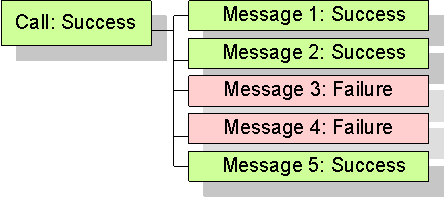
Note that if a warning occurs, the result set will contain both normal data and an error construct. See Error Handling for details.
Testing AddMemberMessagesAAQToBidder
You can test AddMemberMessagesAAQToBidder in the Sandbox.
To test the call, you must have a "bidding" relationship between two users. The caller must have listed the specified item, and the target users must have bid, or placed an offer, on the item. In addition, the item must be currently active.
- Create a seller in the sandbox and have them list an item. You must allow Best Offers on your item if you want to test sending messages to users who have made Best Offers.
- Create a buyer in the sandbox and have them place a bid (or an offer) on the item. You can use the Sandbox UI for this task.
- Call AddMemberMessagesAAQToBidder with the test seller's authentication token. Specify the test buyer in the RecipientID field and the item you created in ItemID field.
- After sending the message, check the buyer's My Messages in the Sandbox UI to see if the message successfully reached their Inbox.
Further testing information can be obtained through Developer Technical Support.
Related Information
See also the reference documentation for these calls:
- AddMemberMessageAAQToPartner - Enables a buyer and seller in an order relationship to send messages to each other's My Messages Inboxes.
- AddMemberMessageRTQ - Enables a seller to reply to a question about an active item listing.
| Output Detail Controls Samples Change History |
Input
See also Samples.
The box below lists all fields that could be included in the call request. To learn more about an individual field or its type, click its name in the box (or scroll down to find it in the table below the box).
See also the Deprecated Objects link above. Fields presented in this color are deprecated, and fields presented in this color are (or soon will be) non-operational.
The XML prototype does not include requester credentials. This is a documentation limitation only (see Standard Requester Credentials for Making Calls).
<?xml version="1.0" encoding="utf-8"?>
<AddMemberMessagesAAQToBidderRequest xmlns="urn:ebay:apis:eBLBaseComponents">
  <!-- Call-specific Input Fields -->
  <AddMemberMessagesAAQToBidderRequestContainer> AddMemberMessagesAAQToBidderRequestContainerType
    <CorrelationID> string </CorrelationID>
    <ItemID> string </ItemID>
    <MemberMessage> MemberMessageType
      <Body> string </Body>
      <EmailCopyToSender> boolean </EmailCopyToSender>
      <RecipientID> string </RecipientID>
      <!-- ... more RecipientID values allowed here ... -->
    </MemberMessage>
  </AddMemberMessagesAAQToBidderRequestContainer>
  <!-- ... more AddMemberMessagesAAQToBidderRequestContainer nodes allowed here ... -->
  <!-- Standard Input Fields -->
  <ErrorLanguage> string </ErrorLanguage>
  <MessageID> string </MessageID>
  <Version> string </Version>
  <WarningLevel> WarningLevelCodeType </WarningLevel>
</AddMemberMessagesAAQToBidderRequest>
| Argument | Type | Occurrence | Meaning |
|---|
| Call-specific Input Fields [Jump to standard fields] |
| AddMemberMessagesAAQToBidderRequestContainer | AddMemberMessagesAAQToBidderRequestContainerType | Required,
repeatable: [1..*] |
An AddMemberMessagesAAQToBidderRequestContainer container is required for each message being sent to unique bidders/potential buyers. A seller can send up to 10 messages to unique bidders/potential buyers in one AddMemberMessagesAAQToBidder call. |
|
AddMemberMessagesAAQToBidderRequestContainer .CorrelationID |
string | Required | A CorrelationID value is required for each AddMemberMessagesAAQToBidderRequestContainer container that is used in the request. The CorrelationID value returned under each AddMemberMessagesAAQToBidderResponseContainer container is used to correlate each member message container in the request with its corresponding member message container in the response. The same CorrelationID value that you pass into a request will be returned in the CorrelationID field in the response. |
|
AddMemberMessagesAAQToBidderRequestContainer .ItemID |
string | Required | A unique identifier for an eBay listing. This field is required and identifies the active listing that is being discussed between the seller and the bidder. |
|
AddMemberMessagesAAQToBidderRequestContainer .MemberMessage |
MemberMessageType | Required | This container consists of message body, the recipient(s) of the message, and a boolean flag to control whether or not a copy of the message is sent to the sender's My eBay Inbox. |
|
AddMemberMessagesAAQToBidderRequestContainer .MemberMessage.Body |
string | Required |
Content of the message is input into this string field. HTML formatting is not allowed in the body of the message. If plain HTML is used, an error occurs and the message will not go through. If encoded HTML is used, the message may go through but the formatting will not be successful, and the recipient of the message will just see the HTML formatting tags. Max length: 1000. |
|
AddMemberMessagesAAQToBidderRequestContainer .MemberMessage .EmailCopyToSender |
boolean | Optional |
Indicates if a copy of the messages is to be emailed to the sender. If omitted, this defaults to whatever the user set in preferences. Default: omitted. |
|
AddMemberMessagesAAQToBidderRequestContainer .MemberMessage.RecipientID |
string | Required,
repeatable: [1..*] |
Recipient's eBay user ID. For AddMemberMessagesAAQToBidder, it must be the seller of an item, that item's bidder, or a user who has made an offer on that item using Best Offer. Note: maxOccurs is a shared schema element and needs to be unbounded for AddMemberMessagesAAQToBidder. For AddMemberMessageRTQ, this field is mandatory if ItemID is not in the request. For all other uses, there can only be one RecipientID. Note: Effective September 26, 2025, both usernames and public user IDs will be accepted in this field. For more information, please refer to Data Handling Compliance. |
| Standard Input Fields |
| ErrorLanguage | string | Optional |
Use ErrorLanguage to return error strings for the call in a different language from the language commonly associated with the site that the requesting user is registered with. Below are some examples from different countries.
|
||||||||||||||||||||||||||||||||||||||||
| MessageID | string | Optional | Most Trading API calls support a MessageID element in the request and a CorrelationID element in the response. If you pass in a MessageID in a request, the same value will be returned in the CorrelationID field in the response. Pairing these values can help you track and confirm that a response is returned for every request and to match specific responses to specific requests. If you do not pass a MessageID value in the request, CorrelationID is not returned. | ||||||||||||||||||||||||||||||||||||||||
| Version | string | Conditional |
The version number of the API code that you are programming against (e.g., 1149). The version you specify for a call has these basic effects:
For the SOAP API: If you are using the SOAP API, this field is required. Specify the version of the WSDL your application is using. For the XML API: If you are using the XML API, this field has no effect. Instead, specify the version in the X-EBAY-API-COMPATIBILITY-LEVEL HTTP header. (If you specify Version in the body of an XML API request and it is different from the value in the HTTP header, eBay returns an informational warning that the value in the HTTP header was used instead.) See:
|
||||||||||||||||||||||||||||||||||||||||
| WarningLevel | WarningLevelCodeType | Optional |
Controls whether or not to return warnings when the application passes unrecognized or deprecated elements in a request. An unrecognized element is one that is not defined in any supported version of the schema. Schema element names are case-sensitive, so using WarningLevel can also help you remove any potential hidden bugs within your application due to incorrect case or spelling in field names before you put your application into the Production environment. WarningLevel only validates elements; it doesn't validate XML attributes. It also doesn't control warnings related to user-entered strings or numbers, or warnings for logical errors. We recommend that you only use this during development and debugging. Do not use this in requests performed in the Production environment. Applicable values: High if the user wishes to receive warnings when the application passes unrecognized or deprecated elements in an API call request. Setting the WarningLevel value to High is not recommended in a production environment. Instead, it should only be used during the development/debugging stage.Low if the user does not wish to receive warnings when the application passes unrecognized or deprecated elements in an API call request. This is the default value if WarningLevel is not specified in the call request.See Warning Level. |
| Input Detail Controls Samples Change History |
Output
See also Samples.
The box below lists all fields that might be returned in the response. To learn more about an individual field or its type, click its name in the box (or scroll down to find it in the table below the box).
See also the Deprecated Objects link above. Fields presented in this color are deprecated, and fields presented in this color are not returned (or soon will not be returned) or are not operational (or soon will be non-operational).
<?xml version="1.0" encoding="utf-8"?>
<AddMemberMessagesAAQToBidderResponse xmlns="urn:ebay:apis:eBLBaseComponents">
  <!-- Call-specific Output Fields -->
  <AddMemberMessagesAAQToBidderResponseContainer> AddMemberMessagesAAQToBidderResponseContainerType
    <Ack> AckCodeType </Ack>
    <CorrelationID> string </CorrelationID>
  </AddMemberMessagesAAQToBidderResponseContainer>
  <!-- ... more AddMemberMessagesAAQToBidderResponseContainer nodes allowed here ... -->
  <!-- Standard Output Fields -->
  <Ack> AckCodeType </Ack>
  <Build> string </Build>
  <CorrelationID> string </CorrelationID>
  <Errors> ErrorType
    <ErrorClassification> ErrorClassificationCodeType </ErrorClassification>
    <ErrorCode> token </ErrorCode>
    <ErrorParameters ParamID="string"> ErrorParameterType
      <Value> string </Value>
    </ErrorParameters>
    <!-- ... more ErrorParameters nodes allowed here ... -->
    <LongMessage> string </LongMessage>
    <SeverityCode> SeverityCodeType </SeverityCode>
    <ShortMessage> string </ShortMessage>
  </Errors>
  <!-- ... more Errors nodes allowed here ... -->
  <HardExpirationWarning> string </HardExpirationWarning>
  <Timestamp> dateTime </Timestamp>
  <Version> string </Version>
</AddMemberMessagesAAQToBidderResponse>
| Return Value | Type | Occurrence | Meaning |
|---|
| Call-specific Output Fields [Jump to standard fields] |
| AddMemberMessagesAAQToBidderResponseContainer | AddMemberMessagesAAQToBidderResponseContainerType | Always,
repeatable: [1..10] |
Container consisting of the Ack field (indicating the result of the send message operation) and the CorrelationID field (used to track multiple send message operations performed in one call). |
|
AddMemberMessagesAAQToBidderResponseContainer .Ack |
AckCodeType | Always |
This enumerated value indicates whether or not the corresponding message was successfully sent to the bidder(s)/potential buyer(s). If the value returned in this field is not Success, the message may have to be resent with another AddMemberMessagesAAQToBidder call.
Applicable values: Code so that your app gracefully handles any future changes to this list. |
|
AddMemberMessagesAAQToBidderResponseContainer .CorrelationID |
string | Always | This is a unique identifier for a message that was sent through the AddMemberMessagesAAQToBidder call. The seller must provide a CorrelationID value for each message that is sent through an AddMemberMessagesAAQToBidderRequestContainer container in the request. The CorrelationID value returned under each AddMemberMessagesAAQToBidderResponseContainer container is used to correlate each member message container in the request with its corresponding member message container in the response. |
| Standard Output Fields |
| Ack | AckCodeType | Always |
A token representing the application-level acknowledgement code that indicates the response status (e.g., success). The AckCodeType list specifies the possible values for the Ack field.
Applicable values: (Not all values in AckCodeType apply to this field.) Code so that your app gracefully handles any future changes to this list. |
| Build | string | Always | This refers to the specific software build that eBay used when processing the request and generating the response. This includes the version number plus additional information. eBay Developer Support may request the build information when helping you resolve technical issues. |
| CorrelationID | string | Conditionally | Most Trading API calls support a MessageID element in the request and a CorrelationID element in the response. If you pass in a MessageID in a request, the same value will be returned in the CorrelationID field in the response. Pairing these values can help you track and confirm that a response is returned for every request and to match specific responses to specific requests. If you do not pass a MessageID value in the request, CorrelationID is not returned. |
| Errors | ErrorType | Conditionally,
repeatable: [0..*] |
A list of application-level errors (if any) that occurred when eBay processed the request. |
| Errors.ErrorClassification | ErrorClassificationCodeType | Conditionally |
API errors are divided between two classes: system errors and request errors.
Applicable values: Code so that your app gracefully handles any future changes to this list. |
| Errors.ErrorCode | token | Conditionally |
A unique code that identifies the particular error condition that occurred. Your application can use error codes as identifiers in your customized error-handling algorithms.
See Errors By Number. |
| Errors.ErrorParameters | ErrorParameterType | Conditionally,
repeatable: [0..*] |
This optional element carries a list of context-specific error variables that indicate details about the error condition. These are useful when multiple instances of ErrorType are returned. |
| Errors.ErrorParameters [ attribute ParamID ] |
string | Conditionally | This optional element carries a list of context-specific error variables that indicate details about the error condition. These are useful when multiple instances of ErrorType are returned. |
| Errors.ErrorParameters.Value | string | Conditionally | This is the value of the request parameter noted in the ParamID attribute. So, if the ParamID value was ItemID, the value in this field would be the actual value of that ItemID. |
| Errors.LongMessage | string | Conditionally | A more detailed description of the condition that raised the error. |
| Errors.SeverityCode | SeverityCodeType | Conditionally |
Indicates whether the error is a severe error (causing the request to fail) or an informational error (a warning) that should be communicated to the user.
Applicable values: If the source of the problem is within the application (such as a missing required element), change the application before you retry the request.
See the Error handling section of the Making a Trading API call guide for more information. When a warning occurs, the error is returned in addition to the business data. In this case, you do not need to retry the request (as the original request was successful). However, depending on the cause or nature of the warning, you might need to contact either the end user or eBay to effect a long term solution to the problem to prevent it from reoccurring in the future. Code so that your app gracefully handles any future changes to this list. |
| Errors.ShortMessage | string | Conditionally | A brief description of the condition that raised the error. |
| HardExpirationWarning | string | Conditionally | Expiration date of the user's authentication token. Only returned within the 7-day period prior to a token's expiration. To ensure that user authentication tokens are secure and to help avoid a user's token being compromised, tokens have a limited life span. A token is only valid for a period of time (set by eBay). After this amount of time has passed, the token expires and must be replaced with a new token. |
| Timestamp | dateTime | Always |
This value represents the date and time when eBay processed the request. The time zone of this value is GMT and the format is the ISO 8601 date and time format (YYYY-MM-DDTHH:MM:SS.SSSZ). See the Time Values section in the eBay Features Guide for information about this time format and converting to and from the GMT time zone. Note: Trading API calls are designed to retrieve very large sets of metadata that change once a day or less often. To improve performance, these calls return cached responses when you request all available data (with no filters). When this occurs, this time value reflects the time the cached response was created. Thus, this value is not necessarily when the request was processed. However, if you specify an input filter to reduce the amount of data returned, the calls retrieve the latest data (not cached). When this occurs, this time value does reflect when the request was processed. |
| Version | string | Always | The version of the response payload schema. Indicates the version of the schema that eBay used to process the request. See the Standard Data for All Calls section in the eBay Features Guide for information on using the response version when troubleshooting CustomCode values that appear in the response. |
| Input Output Samples Change History |
Detail Controls
DetailLevel
This call does not support varying Detail Levels. You do not need to pass DetailLevel in the request.
| Input Output Detail Controls Change History |
Samples
New to making API calls? Please see Making a Call.
Note: Some item IDs, user IDs, or other data in these samples might no longer be active on eBay. If necessary, you can substitute current eBay data in your requests.
Sends messages to two users who have made Best Offers on an item.
Description
Seller m***************r listed an item with a Best Offer option. She received two offers on the book, and she can use AddMemberMessagesAAQToBidder to send messages each bidder with the results of their offers.
Input
This request contains two AddMemberMessagesAAQToBidderRequestContainer nodes, one for each message being sent. Note that the ItemId is the same for each message, although you can use one call to send messages regarding more than a single item. Use CorrelationID values to make it easier to interpret the results.
XML format.

<?xml version="1.0" encoding="utf-8"?>
<AddMemberMessagesAAQToBidderRequest xmlns="urn:ebay:apis:eBLBaseComponents">
  <RequesterCredentials>
    <eBayAuthToken>A*******3</eBayAuthToken>
  </RequesterCredentials>
  <AddMemberMessagesAAQToBidderRequestContainer>
    <!-- This is a seller-defined value, and is used to match up each member message in the response -->
    <CorrelationID>1</CorrelationID>
    <!-- The user making this call must be the seller of the listing ID posted below -->
    <ItemID>1**********2</ItemID>
    <MemberMessage>
      <Body>
        Greetings! Thank you for your offer. In fact, you made the Best Offer,
        so I am happy to inform you that you won the book.
      </Body>
      !-- The user ID of the buyer being sent the message -->
      <RecipientID>b************r</RecipientID>
    </MemberMessage>
  </AddMemberMessagesAAQToBidderRequestContainer>
  <AddMemberMessagesAAQToBidderRequestContainer>
    <CorrelationID>2</CorrelationID>
    <!-- This Item ID value should be the same for each buyer message being sent -->
    <ItemID>1**********2</ItemID>
    <MemberMessage>
      <Body>
        Greetings! Thank you for your offer. I am sorry to inform you that another
        bidder also made an offer, and I have decided to go with their offer.
        Good luck with your future bidding.
      </Body>
      <RecipientID>m*******r</RecipientID>
    </MemberMessage>
  </AddMemberMessagesAAQToBidderRequestContainer>
</AddMemberMessagesAAQToBidderRequest>
Output
The results from this call show that the overall call succeeded, as well as each message within the call.
XML format.
<?xml version="1.0" encoding="utf-8"?>
<AddMemberMessagesAAQToBidderResponse xmlns="urn:ebay:apis:eBLBaseComponents">
  <Timestamp>2018-10-29T18:36:52.001Z</Timestamp>
  <Ack>Success</Ack>
  <Version>1081</Version>
  <Build>e1081_core_Bundled_2854399_R1</Build>
   <AddMemberMessagesAAQToBidderResponseContainer>
    <CorrelationID>*1</CorrelationID>
    <Ack>Success</Ack>
  </AddMemberMessagesAAQToBidderResponseContainer>
  <AddMemberMessagesAAQToBidderResponseContainer>
    <CorrelationID>*2</CorrelationID>
    <Ack>Success</Ack>
  </AddMemberMessagesAAQToBidderResponseContainer>
</AddMemberMessagesAAQToBidderResponse>
| Input Output Detail Controls Samples |
Change History
| Change Date | Description |
|---|---|
| 579 2008-08-20 |
|
| 573 2008-07-09 |
|